


At the end of 2025, I completed my master’s thesis on a topic that had been bothering me at work for quite some time: how to build a professional, automated delivery platform for the Microsoft Power Platform in an enterprise context. In this post, I want to share the story behind this work, what I actually built, and the key lessons that might help you if you are trying to move from “prototypes” to robust, production‑ready solutions.
A Short Primer: Power Platform and ALM
The Microsoft Power Platform is Microsoft’s low‑/no‑code platform for building apps, automations, reports and chatbots — targeted at both professional developers and “makers” from the business. It consists of Power Apps, Power Automate, Power BI, Power Pages and Copilot Studio, all built on top of Microsoft Dataverse.
Application Lifecycle Management (ALM) in this context is about how we develop, test, deliver and maintain these solutions over time. Without ALM, Power Platform initiatives tend to start fast and end in chaos: solutions are created directly in production, versions are unclear, and nobody knows exactly what is running where.
A good ALM approach for Power Platform should provide:
- Clear separation of environments (Dev, PreProd, Prod).
- Versioning and traceability via Git.
- Automated deployments with pipelines instead of manual clicks.
- Reusable components and structured solutions.
- Governance, quality gates and compliance.
My thesis was essentially about bringing these ALM capabilities to a Power Platform landscape that had grown rapidly but lacked a solid delivery backbone.
Why a Delivery Platform for Power Platform?
My employer uses the Microsoft Power Platform strategically and has a clear governance model with three usage types: Business Use, Team Use and Personal Use. Simple automations and lightweight apps were already running successfully, especially in non‑critical areas. But as soon as business‑critical scenarios entered the picture, things became complicated.
The core problem was this: there was no professional delivery platform to automatically move Power Platform solutions from development to pre‑production and finally to production. Deployments were mostly manual, which led to:
- Inconsistent environments (Dev / PreProd / Prod did not always match)
- Limited traceability (who changed what, when, and why?)
- Higher operational risk (manual steps, manual fixes, manual hotfixes)
Several attempts had been made to build such a platform, but they got stuck due to technical limitations, organizational hurdles and the complexity of the Power Platform itself. My thesis started exactly at this point: could we design and implement a working, automated delivery platform for Power Platform under real‑world enterprise constraints?
Goals and Scope of the Thesis
The main objective of the thesis was to design and prototype a delivery platform that automates the entire application lifecycle for Power Platform solutions from development to production while respecting existing governance and security standards.
Concretely, I focused on three dimensions:
- Technical
- Standardise tools and Docker images.
- Define Infrastructure‑as‑Code (IaC) and CI/CD standards tailored to Power Platform.
- Establish consistent versioning and security (secrets, certificates, identities).
- Organisational
- Clarify responsibilities for operation and maintenance of the platform.
- Define processes for test and production approvals.
- Create a rule set for regular toolchain updates.
- Architectural
- Review existing architecture decisions for compatibility with Microsoft best practices.
- Develop an architecture that fits both the Power Platform and the company’s constraints.
The work explicitly focused on the governance and delivery platform for the Power Platform; other technologies were out of scope. Also, I concentrated on Business Use scenarios, as these are the ones where a robust, controlled delivery process is essential.
How I Approached the Problem
The project followed a classic three‑phase approach: analysis, concept and implementation.
Analysis: Understanding Reality
In the analysis phase, I combined several sources:
- Internal documentation and existing architecture decisions (as Architecture Decision Records, ADRs).
- An analysis of existing Power Platform solutions in the company.
- Expert interviews with six Power Platform specialists from different swiss organisations.
- Microsoft best practices and specialist literature on Power Platform ALM and DevOps.
This phase revealed a wide range of use cases — from simple automations to complex, business‑critical applications with integrations to internal APIs and systems. It also showed recurring pain points: solution dependencies, custom connectors, manual deployments and unclear responsibilities.
Concept: Designing the Delivery Platform
Based on the analysis, I derived functional and non‑functional requirements for the delivery platform and translated them into a technical and organisational concept. Each requirement was linked to concrete solution elements: pipeline architecture, tool choices, access control, quality checks and traceability.
Implementation: Prototyping and Validation
In the implementation phase, I built a working prototype that realises the concept as far as possible within the given constraints. The approach was iterative and test‑driven: I built small technical prototypes for key architecture ideas, validated them and fed the learnings back into the concept.
Key Design Decisions
Choosing the CI/CD Platform
I evaluated four CI/CD options: Azure DevOps, GitHub Actions, GitLab and Power Platform Pipelines. Each platform was assessed against criteria such as integration depth, tooling maturity, alignment with internal strategy and operational cost.
The final decision was to use GitLab with the Power Platform CLI (PAC CLI) as the strategic foundation. This choice had several advantages:
- It integrates seamlessly with the existing GitLab infrastructure at the organisation as it is the strategic platform. So no new platform is needed.
- It supports Linux‑based runners, which simplifies operations and aligns with modern container practices.
- It allows a modular, reusable pipeline design using GitLab CI templates.
Architecture Overview
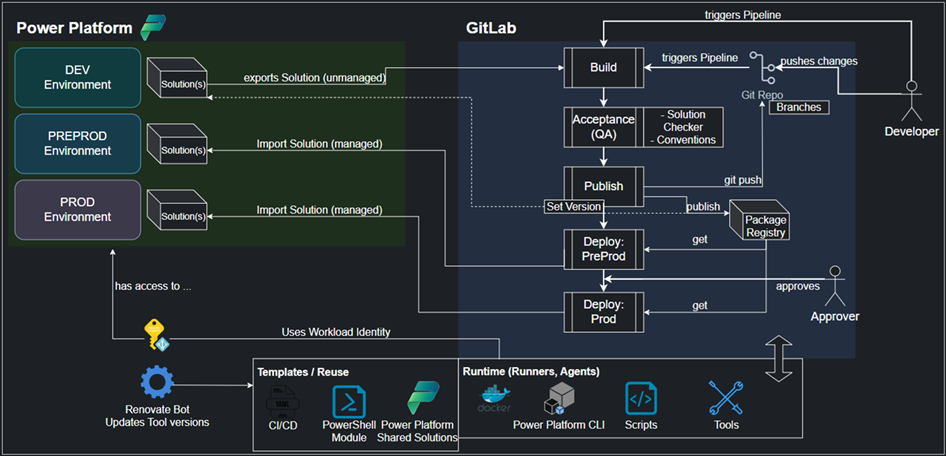
The resulting delivery platform architecture has three central pillars:
- Power Platform environments
- At least three environments: Dev, PreProd and Prod.
- Business Use solutions are developed in Dev and promoted through PreProd to Prod.
- CI/CD pipeline
- A multi‑stage pipeline that covers: validation, build, acceptance/quality gates, deployment and publishing.
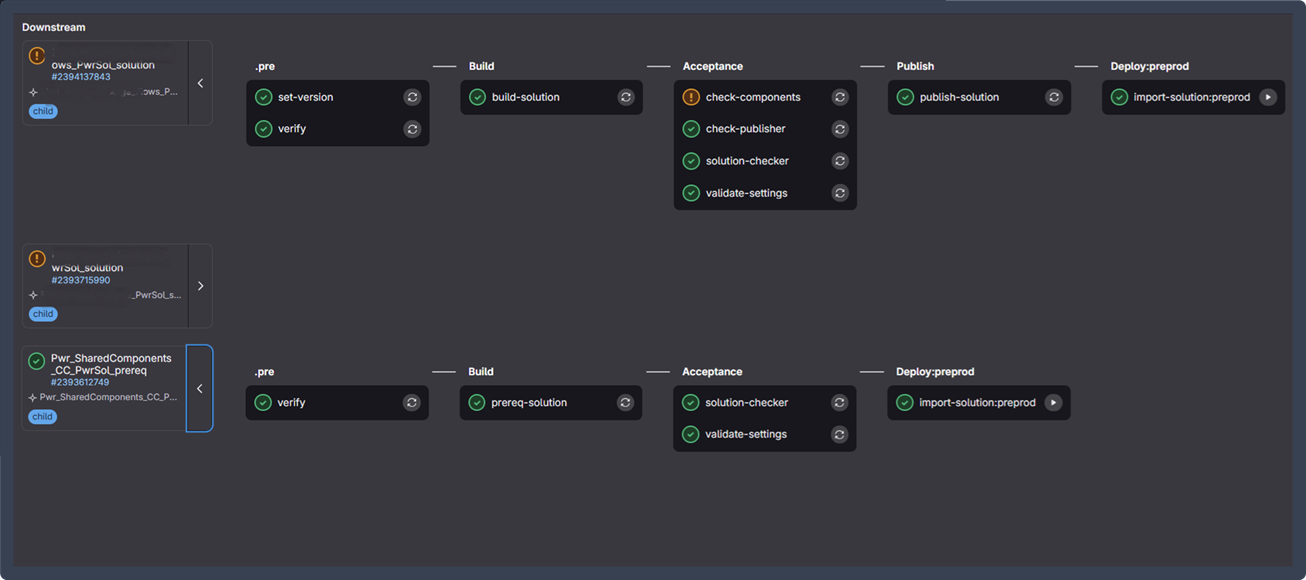
- Support for monorepos and projects with multiple solutions via a child‑pipeline architecture.
- Execution environment and reuse
- A Docker‑based technology stack that encapsulates the required tools (PAC CLI, PowerShell module, etc.).
- A reusable PowerShell module (PacHelpers) and GitLab CI templates that can be shared across projects.
Security and maintainability are built in from the start: authentication uses Workload Identities, secrets are managed centrally, and updates to images and tools follow a defined process.
Inside the Pipeline
To make the concept more concrete, this section walks through the most relevant stages of the prototype pipeline and explains how they work together to deliver a controlled, traceable Power Platform solution lifecycle.
Pre‑Stage: Validation and Versioning
The pipeline starts with a dedicated preparation stage that focuses on correctness and reproducibility before any build or deployment logic is executed. In this stage, the repository structure, configuration files, and required metadata are validated to ensure that the pipeline is running in a consistent and expected state. Missing or misconfigured inputs are detected early, preventing unnecessary downstream executions.
A central responsibility of this stage is version management. Instead of relying on manually maintained version numbers, the pipeline derives a deterministic solution version based on the current date and the pipeline execution context. This version is calculated once and then propagated through the entire pipeline using environment variables and artefacts. As part of this process, the calculated version is written back into the solution’s Solution.xml file to ensure that the exported and packaged artefacts are aligned with the pipeline metadata.
By front‑loading validation and versioning, this stage establishes a reliable baseline for all subsequent steps and ensures that every pipeline run produces uniquely identifiable outputs.
.pre:
  extends: .default-scripts
  stage: .pre
  image: ${BUILD_STACK}
  variables:
    STAGE: dev
  after_script: []
  rules:
    - !reference [.default-rules, rules]

verify:
  extends: .pre

set-version:
  extends: .pre
  needs:
    - job: verify
      optional: false
  artifacts:
    reports:
      dotenv: version.env
    paths:
    - ${PAC_SOLUTION_SUBFOLDER}/Other/Solution.xml
  rules:
    - if: '$CI_PARENT_JOB_STAGE == "Prereq"'
      when: never
    - !reference [.pre, rules]
function Test-EnvVar {
    param(
        [string[]]$Vars
    )

    $allSet = $true

    foreach ($var in $Vars) {
        $value = [System.Environment]::GetEnvironmentVariable($var)
        if ([string]::IsNullOrEmpty($value)) {
            Write-ErrorMessage "❌ Environment variable '$var' is not set or is empty."
            $allSet = $false
        }
    }

    if (-not $allSet) {
        Exit-Script 1
    }

    Write-InfoMessage "✅ All required environment variables are set."
}

$BASE_ENV_VARS = @('PAC_ENVURL_DEV', 'PAC_SOLUTION_NAME')

# Build environment variables list based on pipeline configuration
$envVars = [System.Collections.ArrayList]::new($BASE_ENV_VARS)
# Add environment-specific variables
if ($env:CI_DEPLOY_PREPROD -eq "true") {
    [void]$envVars.Add('PAC_ENVURL_PREPROD')
    Write-InfoMessage "Added PREPROD environment validation"
}

if ($env:CI_DEPLOY_PROD -eq "true") {
    [void]$envVars.Add('PAC_ENVURL_PROD')
    Write-InfoMessage "Added PROD environment validation"
}

# Web pipeline specific validation
if ($env:CI_PIPELINE_SOURCE -eq "web") {
    Write-InfoMessage "Web pipeline detected - validating Jira requirements..."
    [void]$envVars.AddRange(@('CI_JIRA_ID', 'CI_WEB_COMMIT_MESSAGE'))
}

# Validate all required environment variables
Test-EnvVar -Vars $envVars.ToArray()
Write-InfoMessage "✅ Environment variables validation passed."


# Resolve pipeline ID with fallback chain
$pipelineIid = $env:CI_UPSTREAM_PIPELINE_IID ?? $env:CI_PIPELINE_IID ?? 1
Write-InfoMessage "Using Pipeline IID: $pipelineIid."

# Generate version components
$versionDate = Get-Date -Format 'yyyyMMdd'
$versionNumber = "1.0.$versionDate.$pipelineIid"

Write-InfoMessage "Generated solution version: $versionNumber"

# Set environment variable for current session
$env:PAC_PUBLISH_VERSION_NUMBER = $versionNumber

# Write version info to environment file
@(
    "PAC_PUBLISH_VERSION_NUMBER=$versionNumber"
    "CI_UPSTREAM_PIPELINE_IID=$pipelineIid"
) | Out-File -FilePath "version.env" -Encoding utf8

Write-InfoMessage "Environment variables written: PAC_PUBLISH_VERSION_NUMBER, CI_UPSTREAM_PIPELINE_IID."
Write-InfoMessage "✅ Version information written to version.env"

# Resolve solution folder and file path
$pacSolutionFolder = if ($env:PAC_SOLUTION_SUBFOLDER -ne ".") {
    Join-Path -Path "." -ChildPath $env:PAC_SOLUTION_SUBFOLDER
} else {
    "."
}
$pacSolutionFile = Join-Path -Path $pacSolutionFolder -ChildPath "Other/Solution.xml"

# Update Solution.xml version directly (workaround)
if (Test-Path $pacSolutionFile) {
    Write-InfoMessage "Setting version in $pacSolutionFile."

    $xmlContent = Get-Content $pacSolutionFile -Raw
    $xmlContent = $xmlContent -replace '(<Version>).*?(</Version>)', "`${1}$versionNumber`${2}"
    Set-Content -Path $pacSolutionFile -Value $xmlContent

    [xml]$parsedXml = Get-Content $pacSolutionFile
    $currentVersion = $parsedXml.ImportExportXml.SolutionManifest.Version

    Write-InfoMessage "✅ Solution.xml updated successfully."
    Write-InfoMessage "Solution.xml Version: $currentVersion"
}
else {
    Write-InfoMessage "Solution.xml not found at '$pacSolutionFile' - skipping XML update."
}
Build‑Stage: Solution Management
The build stage is responsible for transforming the solution source structure into deployable artefacts. At this point, the pipeline interacts with the Power Platform tooling to export the solution content and prepare it for distribution.
Both unmanaged and managed variants of the solution are created, allowing the same pipeline to support development scenarios as well as controlled deployments into higher environments. The build logic also collects all relevant auxiliary artefacts, such as deployment settings files and execution logs, and publishes them as pipeline artefacts. This makes the build results fully transparent and reusable by later stages.
Special care is taken to ensure that errors originating from external tooling are handled explicitly. Rather than relying solely on exit codes, command output is analysed to detect failures reliably and to provide clear diagnostics. As a result, the build stage produces consistent, versioned packages that can be consumed by quality gates and deployment steps without ambiguity.
build-solution:
  extends: .build
  needs:
    - set-version
  rules:
    - if: >
        $CI_PARENT_JOB_STAGE == "Prereq" ||
        ($CI_EXPORT_SOLUTION == "true" && ($CI_UPSTREAM_PIPELINE_SOURCE == "web" || $CI_PIPELINE_SOURCE == "web"))
      when: never
    - !reference [.default-rules, rules]
  artifacts:
    paths:
      - ${PAC_SOLUTION_NAME}*.zip
      - deploymentSettings_${PAC_SOLUTION_NAME}_*.json
      - logs/pac-log-${CI_JOB_NAME}.txt
    when: always
# pac command workaround to have a proper error and exit code handling
function Invoke-PacCommand {
    param (
        [string[]]$command
    )

    $output = Invoke-Expression -Command "pac $command"

    Write-InfoMessage $output

    $errors = $output -split "`n" | Where-Object { $_ -like "Error:*" }

    foreach ($err in $errors) {
        $message = $err -replace "Error: ", ""
        Write-ErrorMessage $message
    }
    if(![string]::IsNullOrWhiteSpace($errors)){
        Exit-Script 1
    }

    return $output
}

# Define paths
$PAC_SOLUTION_FOLDER = if (![string]::IsNullOrWhiteSpace($env:PAC_SOLUTION_SUBFOLDER) -and $env:PAC_SOLUTION_SUBFOLDER -ne ".") {
    Join-Path "." $env:PAC_SOLUTION_SUBFOLDER
} else {
    "."
}

$PAC_SOLUTION_ZIP          = "./$($env:PAC_SOLUTION_NAME).zip"
$PAC_SOLUTION_MANAGED_ZIP  = "./$($env:PAC_SOLUTION_NAME)_$($env:PAC_PUBLISH_VERSION_NUMBER)_managed.zip"
$PAC_SOLUTION_FILE         = Join-Path $PAC_SOLUTION_FOLDER "Other/Solution.xml"
$PAC_DEPLOYMENT_SETTINGS   = Join-Path $PAC_SOLUTION_FOLDER "deploymentSettings_$($env:PAC_SOLUTION_NAME)_$($env:STAGE).json"

# Get solution version
[xml]$xml = Get-Content $PAC_SOLUTION_FILE
Write-InfoMessage "Solution.xml Version: $($xml.ImportExportXml.SolutionManifest.Version)"

# Pack unmanaged
Write-InfoMessage "Packing unmanaged solution..."
Invoke-PacCommand "solution pack --zipfile `"$PAC_SOLUTION_ZIP`" --folder `"$PAC_SOLUTION_FOLDER`" --packagetype Unmanaged"

# Pack managed
Write-InfoMessage "Packing managed solution..."
Invoke-PacCommand "solution pack --zipfile `"$PAC_SOLUTION_MANAGED_ZIP`" --folder `"$PAC_SOLUTION_FOLDER`" --packagetype Managed"

# Handle deployment settings
foreach ($stage in @("dev","preprod","prod")) {
    $stageFile = $PAC_DEPLOYMENT_SETTINGS.Replace("_$($env:STAGE)","_$stage")
    if ((Test-Path $stageFile) -and
        ![string]::IsNullOrWhiteSpace($env:PAC_SOLUTION_SUBFOLDER) -and
        ($env:PAC_SOLUTION_SUBFOLDER -ne ".")) {
        Write-InfoMessage "Get Deployment Settings for DEV..."
        Copy-Item $stageFile "." -Force
    }
}

Write-InfoMessage "✅ Solution packed: $PAC_SOLUTION_ZIP and $PAC_SOLUTION_MANAGED_ZIP"
Exit-Script 0
Acceptance‑Stage: Quality Gates
Before a solution is allowed to move into a target environment, it must pass a set of automated quality checks. The acceptance stage acts as a formal gate in the pipeline and evaluates the solution against predefined quality criteria.
In this stage, the solution artefacts produced earlier are analysed using tools such as the Power Platform Solution Checker. The pipeline connects to a designated environment, executes the checks, and collects the resulting reports in a structured format. These reports are stored as artefacts so that findings remain traceable even after the pipeline run has completed.
The results are parsed automatically and evaluated against an allowed severity threshold. Only findings that exceed the defined tolerance are treated as violations. This approach ensures that critical issues block the pipeline, while lower‑severity findings can still be reviewed without unnecessarily interrupting the delivery flow.
By enforcing quality standards in an automated and repeatable way, this stage helps maintain solution health and reduces the risk of introducing structural or performance issues into downstream environments.
.acceptance:
  extends: .default-scripts
  stage: Acceptance
  image: ${BUILD_STACK}
  rules:
    - !reference [.default-rules, rules]

solution-checker:
  extends: .acceptance
  variables:
    STAGE: "preprod"
  needs:
    - job: export-solution
      optional: true
    - job: build-solution
      optional: true
    - job: prereq-solution
      optional: true
  artifacts:
    paths:
      - reports
      - logs/pac-log-${CI_JOB_NAME}.txt
    when: always
# Function to connect to a Power Platform environment using different authentication methods
function Connect-PwrEnv {
    param (
        [string]$environment
    )

    # Validate and format environment URL
    if (-not $environment.StartsWith("https://")) {
        $environment = "https://$($environment)"
    }

    Write-InfoMessage "Logging into environment $($environment)"

    if ($env:CI) {
        $projectTitle = $env:CI_PROJECT_TITLE
        $app = $projectTitle.Split('-')[0].Substring(0, 3).ToUpper()
        az login --service-principal -u "$($env:AZURE_CLIENT_ID)" -t "$($env:AZURE_TENANT_ID)" --federated-token "$($env:AZURE_FEDAUTH_TOKEN)" -o none
    } else {
        $app ="PWR"
        Write-InfoMessage "Not logged in. Initiating interactive login..."
        az config set core.login_experience_v2=off -o none
        az login -o table
    }

    if ($env:PAC_USE_WORKLOAD_IDENTITY -ne "true") {
        Write-InfoMessage "Login with apps"
        $PWR_APP_ID = $(az keyvault secret show --name "$app-APPID-$($env:STAGE.toUpper())" --vault-name "$($env:KEYVAULT_NAME)" --query value | tr -d '"')
        $PWR_SECRET = $(az keyvault secret show --name "$app-SECRET-$($env:STAGE.toUpper())" --vault-name "$($env:KEYVAULT_NAME)" --query value | tr -d '"')
        $PWR_TENANT_ID = $(az keyvault secret show --name "$app-TENANTID-$($env:STAGE.toUpper())" --vault-name "$($env:KEYVAULT_NAME)" --query value | tr -d '"')
        Invoke-PacCommand "auth create --environment `"$environment`" --applicationId `"$PWR_APP_ID`" --clientSecret `"$PWR_SECRET`" --tenant `"$PWR_TENANT_ID`""
    }
    else {
        Write-InfoMessage "Login using MI"
        Invoke-PacCommand "auth create --environment `"$environment`" --managedIdentity"
    }

    Invoke-PacCommand "auth who"
}

Connect-PwrEnv -environment "$($env:PAC_ENVURL_DEV)"

Write-InfoMessage "Checking solution: $($env:PAC_SOLUTION_NAME)"

# Create report output directory
$reportPath = Join-Path -Path "./reports" -ChildPath $env:PAC_SOLUTION_NAME
Write-InfoMessage "Creating report directory at $reportPath..."
New-Item -ItemType Directory -Path $reportPath -Force | Out-Null

$PAC_SOLUTION_ZIP = Join-Path -Path "." -ChildPath "$($env:PAC_SOLUTION_NAME).zip"
Write-InfoMessage "Checking solution from: $($PAC_SOLUTION_ZIP)"

# Run solution checker
$result = Invoke-PacCommand "solution check --path $PAC_SOLUTION_ZIP --environment $env:PAC_ENVURL_PREPROD --outputDirectory $reportPath"

# Analyze report
Expand-Archive -Path "$($reportPath)/$(Get-ChildItem -Path $reportPath -Name *.zip)" -DestinationPath $reportPath
$report = Get-Content "$($reportPath)/$(Get-ChildItem -Path $reportPath -Name *.sarif | Select-Object -First 1)" | ConvertFrom-Json

$table = @()
$violations = @()

foreach ($result in $report.runs[0].results) {
    $table += [PSCustomObject]@{
        RuleId    = $result.ruleId
        Severity  = $result.properties.severity
        Message   = $result.message.text
    }
}

$table | Format-Table -Wrap -AutoSize

$allowedSeverities = @("Medium", "Low", "Informational")

$violations += @(
    $report.runs[0].results | Where-Object {
        $allowedSeverities -notcontains $_.properties.severity
    }
)
Publish‑Stage: Versioning and Registry
After a successful build and validation cycle, the pipeline publishes the resulting artefacts and metadata. The publish stage ensures that every solution version produced by the pipeline is captured and made available for future reference.
By publishing versioned artefacts to a registry, the pipeline establishes a clear link between source code, pipeline execution, and deployed solution versions. This enables full traceability and makes it possible to reproduce or audit deployments at a later point in time.
The publish stage therefore acts as the final consolidation step, turning a pipeline run into a documented and repeatable delivery unit.
.publish:
  extends: .default-scripts
  stage: Publish
  image: ${BUILD_STACK}
  variables:
    STAGE: dev

publish-solution:
  extends: .publish
  needs:
    - job: set-version
      optional: false
    - job: build-solution
      optional: false
    - job: solution-checker
      optional: true
  after_script: []
  rules:
    - if: >
        $CI_COMMIT_BRANCH == $CI_DEFAULT_BRANCH &&
        ($CI_UPSTREAM_PIPELINE_SOURCE == "push" || $CI_PIPELINE_SOURCE == "push")
Deploy‑Stage: Environment Deployment
Once a solution has passed validation and quality checks, it can be deployed into controlled environments such as PreProd or Prod. The deploy stage is responsible for importing the managed solution packages into the target environment and applying environment‑specific configuration.
The pipeline dynamically resolves the correct environment based on the current stage and establishes a secure connection using the configured authentication method. Before importing, it checks whether the solution already exists in the environment and adjusts the import behaviour accordingly.
Deployment behaviour is highly configurable through pipeline variables. Depending on the selected options, the import process can activate plugins, publish customizations, perform staged upgrades, or skip specific dependency checks. Deployment settings files are applied when available, allowing connection references and environment variables to be mapped consistently across environments.
This stage is designed to be both flexible and controlled, supporting automated deployments while still allowing manual approval steps where required.
.deploy:preprod:
  extends: .default-scripts
  stage: Deploy:preprod
  image: ${DEPLOY_STACK}
  variables:
    STAGE: "preprod"
  rules:
    - if: >
        $CI_COMMIT_BRANCH == $CI_DEFAULT_BRANCH &&
        ($CI_UPSTREAM_PIPELINE_SOURCE == "push" || $CI_PIPELINE_SOURCE == "push") &&
        $CI_DEPLOY_PREPROD == "true" &&
        $CI_MANUAL_PREPROD == "true"
      when: manual
    - if: >
        $CI_COMMIT_BRANCH == $CI_DEFAULT_BRANCH &&
        ($CI_UPSTREAM_PIPELINE_SOURCE == "push" || $CI_PIPELINE_SOURCE == "push") &&
        $CI_DEPLOY_PREPROD == "true" &&
        $CI_MANUAL_PREPROD == "false"

import-solution:preprod:
  extends: .deploy:preprod
  artifacts:
    paths:
      - logs/pac-log-${CI_JOB_NAME}.txt
    when: always
    reports:
      dotenv: solution-apply.env
function Test-True($v) {
    return ($v -match '^(?i:true|1|yes)$')
}

# Determine environment from STAGE
switch ($env:STAGE.ToLower()) {
    "preprod" {
        $env:PAC_ENVURL = $env:PAC_ENVURL_PREPROD
        Write-InfoMessage "Using PREPROD environment: $env:PAC_ENVURL"
    }
    "prod" {
        $env:PAC_ENVURL = $env:PAC_ENVURL_PROD
        Write-InfoMessage "Using PROD environment: $env:PAC_ENVURL"
    }
    default {
        Write-ErrorMessage "Unknown stage: $env:STAGE. Valid values are 'preprod' or 'prod'."
        Exit-Script 1
    }
}

$PAC_SOLUTION_ZIP = Join-Path -Path "." -ChildPath "$($env:PAC_SOLUTION_NAME)_$($env:PAC_PUBLISH_VERSION_NUMBER)_managed.zip"
$PAC_DEPLOYMENT_SETTINGS = Join-Path -Path "." -ChildPath "deploymentSettings_$($env:PAC_SOLUTION_NAME)_$($env:STAGE).json"

Connect-PwrEnv -environment "$($env:PAC_ENVURL)"

Write-InfoMessage "Verify if $($env:PAC_SOLUTION_NAME) already exists in $($env:PAC_ENVURL)..."
$solutionExists = Test-Solution -environment "$($env:PAC_ENVURL)" -solution "$($env:PAC_SOLUTION_NAME)"
if ($solutionExists) {
    $env:PAC_SOLUTION_APPLY = $true
} else {
    $env:PAC_SOLUTION_APPLY = $false
}

# Set parameters for pac conmands
$syncOptions = "--async --max-async-wait-time 60"

$importAdditionalOptions = @()
if (Test-True $env:CI_DEPLOY_AS_HOLDING -and Test-True $env:PAC_SOLUTION_APPLY) { $importAdditionalOptions += '--import-as-holding' }
if (Test-True $env:CI_DEPLOY_ACTIVATE_PLUGINS)                                  { $importAdditionalOptions += '--activate-plugins' }
if (Test-True $env:CI_DEPLOY_FORCE_OVERWRITE)                                   { $importAdditionalOptions += '--force-overwrite' }
if (Test-True $env:CI_DEPLOY_PUBLISH_CHANGES)                                   { $importAdditionalOptions += '--publish-changes' }
if (Test-True $env:CI_DEPLOY_SKIP_DEP_CHECK)                                    { $importAdditionalOptions += '--skip-dependency-check' }
if (Test-True $env:CI_DEPLOY_SKIP_LOWER_VERSION)                                { $importAdditionalOptions += '--skip-lower-version' }
if (Test-True $env:CI_DEPLOY_STAGE_AND_UPGRADE)                                 { $importAdditionalOptions += '--stage-and-upgrade' }

if ((Test-Path "$($PAC_DEPLOYMENT_SETTINGS)")) {
    $importAdditionalOptions = "$($importAdditionalOptions) --settings-file `"$($PAC_DEPLOYMENT_SETTINGS)`""
} else {
    Write-InfoMessage "No deployment settings definied. Importing without deployment settings..."
}

Write-InfoMessage "Import solution $($env:PAC_SOLUTION_NAME)..."
Write-InfoMessage "...with flags: $($importAdditionalOptions)"

$output = Invoke-PacCommand "solution import --environment $($env:PAC_ENVURL) --path $($PAC_SOLUTION_ZIP) $($syncOptions) $($importAdditionalOptions -join ' ')"

if ($output -like '*Skipping import*') {
    $env:PAC_SOLUTION_APPLY = $false
}

Exit-Script 0
Generate‑Stage: Monorepo Orchestration
For repositories containing multiple solutions, the pipeline includes a generation stage that dynamically orchestrates child pipelines. Instead of duplicating pipeline definitions for each solution, this stage inspects repository configuration and generates a child pipeline configuration on the fly.
Each solution is mapped to its own execution path, while still relying on a shared base pipeline. Dependencies between solutions can be expressed explicitly, ensuring that prerequisite solutions are processed in the correct order. The generated pipeline configuration is stored as an artefact and then triggered as a dependent pipeline.
This approach allows complex, multi‑solution repositories to remain maintainable while still benefiting from a standardized and centrally governed delivery process.
generate-child-pipelines:
  extends: .default-scripts
  stage: Generate
  image: ${BUILD_STACK}
  after_script: []
  artifacts:
    paths:
      - generated/child.yml

run-child-pipelines:
  stage: Trigger
  trigger:
    include:
      - artifact: generated/child.yml
        job: generate-child-pipelines
    strategy: depend
  needs:
    - job: generate-child-pipelines
$childFile = "generated/child.yml"
New-Item -ItemType Directory -Force -Path "generated" | Out-Null
Set-Content -Path $childFile -Value "stages: [Prereq, Holding, Functional]`n"
$variables = @"
variables:
  ...
"@
Add-Content -Path $childFile -Value $variables

function Add-Jobs {
    param (
        [string[]]$Solutions,
        [string]$Stage,
        [string]$Suffix,
        [string]$StackVersion
    )

    $prevJob = $null

    foreach ($sol in $Solutions) {
        $jobName = "${sol}_$Suffix"
        Add-Content -Path $childFile -Value "`n${jobName}:`n  stage: $Stage"

        if ($prevJob) {
        Add-Content -Path $childFile -Value "  needs: [$prevJob]"
        }

        $ciJob = @"
  variables:
    PAC_SOLUTION_NAME: "$sol"
    PAC_SOLUTION_SUBFOLDER: "$sol"
    CI_PARENT_JOB_STAGE: "$Stage"
  trigger:
    include:
    - project: 'pwr-base-stack'
      ref: '$StackVersion'
      file: '/pwr-base-paclib/pwr.gitlab-ci.yml'
    strategy: depend
  rules:
  - if: '`$CI_UPSTREAM_PIPELINE_SOURCE == "web"'
  - if: '`$CI_UPSTREAM_PIPELINE_SOURCE == "merge_request_event"'
  - if: '`$CI_COMMIT_BRANCH == `$CI_DEFAULT_BRANCH && `$CI_UPSTREAM_PIPELINE_SOURCE == "push"'
"@
        Add-Content -Path $childFile -Value $ciJob
        if (($env:CI_PIPELINE_SOURCE ?? "") -ne "merge_request_event" -and ($env:CI_UPSTREAM_PIPELINE_SOURCE ?? "") -ne "merge_request_event") {
          $prevJob = $jobName
        }
    }
}

if ($env:BUILD_STACK -match ':(?<version>[\d\.]+)$') {
  $stackVersion = $matches['version']
}

# Process Prerequisite Solutions
if (![string]::IsNullOrWhiteSpace($env:PAC_PREREQ_SOLUTIONS)) {
  Write-InfoMessage "Processing PAC_PREREQ_SOLUTIONS..."
  $prereq = $env:PAC_PREREQ_SOLUTIONS -split ';' | Where-Object { $_ -ne "" }
  Add-Jobs -Solutions $prereq -Stage "Prereq" -Suffix "prereq" -StackVersion $stackVersion
} else {
  Write-InfoMessage "PAC_PREREQ_SOLUTIONS is empty — skipping"
}

# Process Holding and Functional Solutions
$hold = @()
if (![string]::IsNullOrWhiteSpace($env:PAC_HOLDING_SOLUTIONS)) {
  Write-InfoMessage "Processing Holding Solutions..."
  $hold = $env:PAC_HOLDING_SOLUTIONS -split ';' | Where-Object { $_ -ne "" }
  Add-Jobs -Solutions $hold -Stage "Holding" -Suffix "solution" -StackVersion $stackVersion
} else {
  Write-InfoMessage "PAC_HOLDING_SOLUTIONS is empty — skipping"
}

$func = @()
if (![string]::IsNullOrWhiteSpace($env:PAC_FUNC_SOLUTIONS)) {
  Write-InfoMessage "Processing Functional Solutions..."
  $func = $env:PAC_FUNC_SOLUTIONS -split ';' | Where-Object { $_ -ne "" }
  Add-Jobs -Solutions $func -Stage "Functional" -Suffix "solution" -StackVersion $stackVersion
} else {
  Write-InfoMessage "PAC_FUNC_SOLUTIONS is empty — skipping"
}
Additional stages …
… such as PowerShell linting or extended logging, complement the core pipeline by improving robustness, diagnostics, and long‑term maintainability without changing the overall execution model.
Security, Identities and Governance
A delivery platform is only useful if it is secure. The design therefore follows the principle of least privilege: every pipeline step runs with the minimum permissions required.
Key aspects:
-
Service principals / Workload Identities
- Technical identities are used instead of personal accounts for deployments and administrative tasks.
- Roles and permissions are defined centrally and documented in a permission matrix.
-
Secret management
- Keys and tokens are stored in Azure Key Vault.
- Regular rotation and central management reduce security risks.
-
Governance integration
- The platform respects the existing governance model, especially for Business Use solutions and environment strategies.
- Responsibilities for operation, updates and approvals are documented.
From Theory to Practice: Validation with Real Solutions
A concept is only as good as its behaviour in reality. To validate the prototype, I tested it with:
- Smaller solutions to verify basic functionality and typical deployment flows.
- A complex reference project to test dependencies, staging and quality gates under realistic conditions.
The result: the prototype delivery platform fulfilled all defined Priority‑1 requirements. It demonstrated that professional DevOps processes are absolutely possible, even in a low‑/no‑code environment like the Power Platform.
Technically, the platform achieved:
- Fully automated pipelines from Dev to Prod.
- Consistent versioning aligned with pipeline runs.
- Quality gates and traceability via Git, pipeline logs and registry entries.
Architecturally, the child‑pipeline design and modular technology stack proved robust and flexible enough to handle projects with multiple solutions.
What I Learned
Looking back, there are a few insights that stand out for me personally:
-
Power Platform needs real engineering If you treat Power Apps and Flows as “just quick automations”, your landscape will become unmanageable as soon as business‑critical use cases appear. You need architecture, ALM and DevOps, just like in classic software development.
-
Start with governance and environments Clear usage types (Personal, Team, Business) and a consistent environment strategy (Dev, PreProd, Prod) are non‑negotiable. Without that, any delivery platform will end up enforcing inconsistent rules.
-
Automation is a change in culture Pipelines and quality gates are not only technical tools but also change how teams work. Responsibilities, roles and processes must evolve together with the platform.
-
Low‑/no‑code does not mean low standards Low‑code platforms can absolutely meet enterprise‑level requirements for security, governance and quality. But you need to invest in the right delivery foundations.
Outlook: Where This Can Go Next
The thesis closes with an outlook on further development possibilities that I also see as interesting topics for future work and blog posts:
- Extending automated tests (beyond basic quality gates) into the pipeline.
- Improving support for different solution strategies and patterns.
- More sophisticated monitoring, logging and reporting for ALM processes.
- Tighter integration with governance tools like the Power Platform Center of Excellence.
Wrapping Up
For me, this master’s thesis was more than an academic exercise. It was an opportunity to bring structure, reliability and professional engineering practices into a rapidly growing Power Platform landscape. The prototype delivery platform shows that low‑/no‑code and DevOps are not opposites, but a powerful combination when done right.
If you are interested in specific parts, for example the GitLab CI configuration, the PowerShell helper module, or how I implemented versioning and quality gates, let me know. I am happy to dedicate separate posts to those topics and share concrete snippets and examples.