


A bit over a year ago, a post on this blog called Upgrading SPFx Solutions walked through the manual process of upgrading a SharePoint Framework solution: generate the M365 CLI upgrade report, work through it instruction by instruction, deal with the third-party packages the CLI does not touch, fight the build until it passes. That post ended with “tips & tricks from real-world experience” — which was a polite way of saying these are the workarounds you find the hard way. It is still accurate. It is just no longer the fastest path.
This post introduces PANTOUM, an open-source SPFx upgrade automation tool designed to take the repetitive, tedious work out of SPFx upgrades — and, along the way, to show what “agentic coding” looks like when it is pointed at a concrete, painful, real-world problem.
PANTOUM is MIT-licensed, available now on GitHub , with a documentation site and an interactive architecture walkthrough .
Heads up: PANTOUM currently runs on Claude only (via Claude Code subscription or
ANTHROPIC_API_KEY).
Table of Contents
- Table of Contents
- The problem PANTOUM solves
- Origin: ten months of iteration
- What PANTOUM is
- The three layers
- How it actually works
- What it handles out of the box
- Three interfaces, same engine
- Try it yourself
- Where this is going
- Resources
The problem PANTOUM solves
If you have ever upgraded a SharePoint Framework solution by hand, you already know what the afternoon looks like.
You generate the upgrade report with m365 spfx project upgrade. You read through the instructions. You start applying them, one at a time. The dependency bumps land cleanly. The config rewrites are mostly fine. Then you hit the part where PnP JS needs to move from v3 to v4 and your imports stop resolving. You fix the imports. You hit a build error in a webpack-patch you forgot you had. You fix it. You hit a Sass deprecation warning that the new Heft pipeline turned into an error. You fix it. You re-run the build. It fails on a different file. You wonder how many of those files there are. You start to understand that this afternoon is not actually an afternoon.
This pain scales. Across a company maintaining a suite of SPFx solutions, every SPFx release turns into a line item on someone’s backlog. In community events like Hacktoberfest, the same story plays out in public: maintainers open the samples repo, the upgrade is mostly mechanical, mostly tedious, and mostly the same work being re-done by a different person on a different solution. Most of the work is repetitive. Some of it is subtly tricky. All of it eats time that could go into shipping features.
PANTOUM exists to take that time back.
Origin: ten months of iteration
PANTOUM — or at least the idea behind it — is roughly ten to eleven months old. I started on it in mid-2025 because I was tired of watching how much manual upgrade work SPFx teams were still doing: inside my own company, in the Hacktoberfest pull requests I kept bumping into, in the public samples. The problem was well-scoped, repetitive, and painful enough to be worth automating. The open question I kept turning over was: automating it how?
My first experiment was to go fully local. Local models, no cloud, no API costs, a tool anyone could run without signing up for anything. Ten months ago, that bet did not pay off. Local models at the time were simply not powerful enough for the kind of multi-file, multi-step, verify-and-retry work that a real-world SPFx upgrade requires. The deterministic parts worked. The parts that needed real reasoning — “this import path changed, here is the build error, here is the surrounding code, figure out what to do” — did not.
What I am shipping now is not a vibe-coded weekend project. PANTOUM is the result of ten-plus months of rewrites and course corrections: switching runtimes, redrawing the boundary between deterministic patches and AI-driven fixes, tightening the guardrails around the AI loop, adding verification, ripping out things that did not work, and re-running the whole thing on real SPFx solutions until it stopped breaking. The three things it does today are the three things that survived that process.
PANTOUM runs on top of Claude right now, and the quality of the result is driven in large part by how capable the model is inside the guardrails. That is the cutting edge today. It is not going to stay the cutting edge for long — local coding assistants like OpenCode and local LLMs like Qwen are catching up fast, and I built PANTOUM’s engine around an adapter pattern on purpose so the runtime is replaceable. Today’s best answer is Claude; tomorrow’s might be a model you run yourself, on your own hardware, for free.
The bigger point I am making with this post is the direction this is all heading. LLMs and agentic coding assistants are starting to eat the repetitive parts of software maintenance, and PANTOUM is my concrete example of what that looks like when you aim it at a specific, well-defined pain point — and iterate on it for long enough that what you ship is actually ready to use.
What PANTOUM is
PANTOUM is an SPFx upgrade automation tool. It takes a folder of SPFx solutions, runs the M365 CLI upgrade for each one, translates every instruction into a deterministic patch, applies the patches, runs the build, hands the messy parts (PnP migration, MGT deprecation, build errors that do not fit a template) to an AI runtime inside a guardrailed loop, and produces a Markdown and JSON report ready to attach to a pull request.
It is not a replacement for the M365 CLI. It is built on top of it. The M365 CLI is the source of truth for what an SPFx upgrade should do. PANTOUM is the engine that turns that source of truth into actually-applied changes, finishes the parts the CLI does not touch, and produces a report worth reviewing.
Two links to anchor the rest of this post:
PANTOUM has been used on the PuntoBello suite of SPFx solutions. It has run on every PuntoBello solution, on real upgrades, including the SPFx 1.21 → 1.22 step that introduced the Heft build system migration. Beyond PuntoBello, I have also put it to work on various samples from the pnp/sp-dev-fx-webparts repository — different authors, different coding styles, different third-party dependencies, which is exactly the kind of variety that stress-tests the engine.
The three layers
PANTOUM splits the work into three layers: deterministic patches for the repetitive parts, a guardrailed AI loop for the tricky migrations, and a review step that sits on top of both.
The repetitive work, done for you
For each SPFx solution, PANTOUM runs the mechanical upgrade work as deterministic steps. Dependency bumps. Config rewrites. Script migrations. Patch application. The kind of work where the answer is the same every single time and there is no interesting decision to make.
Same inputs produce the same patch output every run. Tweaking a setting and re-running does not leave you wondering what state the previous attempt left things in — the run starts from the same known state. When something goes sideways mid-run, the fix is to fix the cause and re-run, not to roll back a half-applied upgrade.
AI inside guardrails
For the parts that are not mechanical — the PnP v1/v2/v3 → v4 migration, the Microsoft Graph Toolkit deprecation, build errors that do not fit a deterministic patch — PANTOUM ships migration prompts and a build-fix loop that hand the work to an AI runtime (currently Claude).
Each AI fix is verified. After the model makes a change, PANTOUM either re-runs the build or greps for the patterns the migration was supposed to remove. If the verification fails, it retries. After the configured number of retries (default 3, configurable 1–10), if the fix has not converged, PANTOUM stops, writes what it tried into the report, and hands the steering wheel back to you. The AI is a tool inside a loop, not an autonomous agent acting freely on your code.
Hands off, eyes on
PANTOUM does the work, you do the review. Every change — deterministic patches and AI fixes alike — lands as a tracked entry in a Markdown and JSON report. Each patch has an ID (the FN-prefixed ones come from the M365 CLI, the M-prefixed ones from pantoum.patches.yml, the C-prefixed ones from the AI runtime), a description, and a before/after.
The report reads the same way a pull request does: top to bottom, in one sitting. It attaches to the actual pull request when the upgrade ships. Nothing is “just done” without an entry.
How it actually works
The pipeline for a single SPFx solution:
- Discover — Scan the folder for
.yo-rc.jsonfiles and find every SPFx solution. - M365 CLI upgrade report — Run
m365 spfx project upgrade --toVersion <target> --output jsonfor each solution. Parse the JSON. - Generate patches — Translate every instruction in the upgrade report into a
PatchObject. Layer in the deterministic steps frompantoum.patches.yml(Sass deprecation suppression, gulp → Heft script translation, env injection, rush-stack-compiler removal, and so on). - Apply patches — Update files, dependencies, and configs.
- Build and test — Run
npm run build. If it fails, hand the error output to the AI build-fix loop. - Third-party updates (optional) — Bump non-Microsoft dependencies after the SPFx upgrade lands cleanly.
- Report — Write the JSON, the Markdown, and the per-solution metadata into a
pantoum_run_{runId}/directory.
The interesting bits live in two places: the deterministic patch generator (src/patchGeneratorDeterministic.ts — a translator from M365 CLI instruction IDs to patch objects) and the YAML config (pantoum.patches.yml — the declarative source of every manual step, every condition, every version correction, every detection pattern). A later post in this series goes deeper on both.
What it handles out of the box
Without writing any custom rules:
- PnP JS v1, v2, or v3 → v4 — Full code transformation: imports,
.datawrapper removal,.itemchaining →getById(), taxonomy →@pnp/graph, paginator changes. The migration prompt lives insrc/templates/pnp-v4-migration.mdand you can read it. - Microsoft Graph Toolkit deprecation —
@microsoft/mgt-spfx→mgt-element+mgt-sharepoint-provider+ web components, plus the supporting Babel and lazy-loading scaffolding. - The gulp → Heft build system migration for SPFx 1.22+ — Sass deprecation suppression, custom env-variable injection, rush-stack-compiler removal, the CSS double-hashing fix for PnP controls.
- PnP companion package upgrades —
@pnp/sp,@pnp/core,@pnp/graph,@pnp/spfx-property-controls,@pnp/spfx-controls-react. - React 17+ lifecycle compatibility checks — Warns about
UNSAFE_methods. - Generic build error fixes at runtime — TypeScript compilation errors, missing imports, API compatibility issues.
The AI prompts are plain Markdown files in src/templates/. You can read them. You can override them. You can add your own. Nothing is hidden in the binary.
Three interfaces, same engine
PANTOUM has three ways to drive it. The engine underneath is identical.
| Interface | When you use it |
|---|---|
pantoum CLI |
Scripting, automation, CI/CD pipelines. The most direct path. |
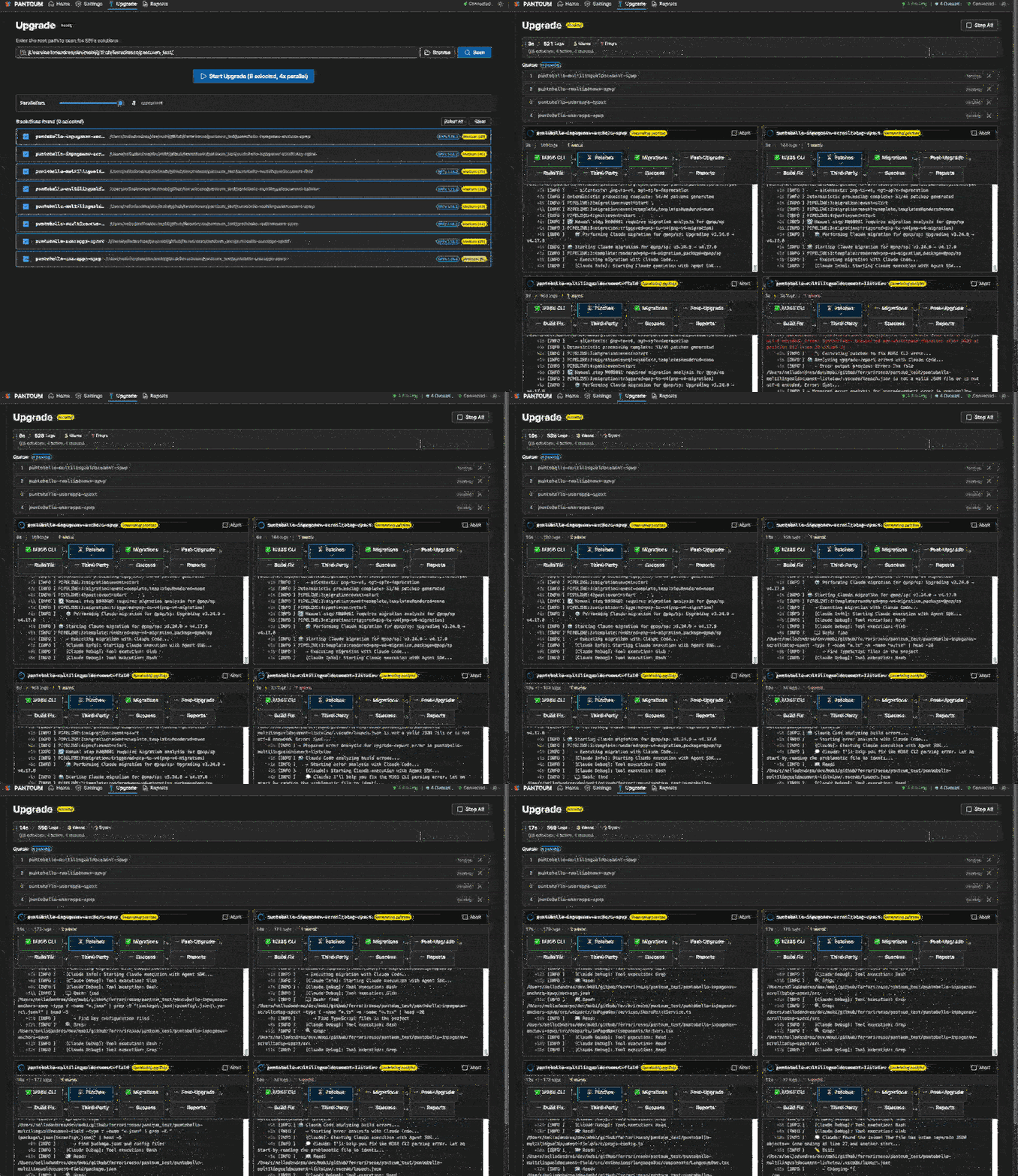
| PANTOUM Studio | A React + Fluent UI webapp for solution selection, live upgrade monitoring, and report browsing. The friendliest path. |
| Claude Code plugin | Slash commands inside Claude Code: /pantoum-upgrade, /pantoum-analyze, /pantoum-doctor, /pantoum-studio. The path that fits if you already live in your editor. |
Pick whichever fits your workflow. Same engine, same patches, same reports.
Try it yourself
git clone https://github.com/pantoum-spfx/pantoum.git
cd pantoum
npm install
npm run build
npm run doctor
npm run webapp
npm run doctor checks your environment (Node 22+, M365 CLI, Claude authentication). npm run webapp launches PANTOUM Studio in your browser. From there: open Settings, set your target SPFx version, scan your repository, and run the upgrade. Review the report.
The full quick start, the settings reference, and the architecture deep dive are on the documentation site .
Where this is going
The interesting question from here is whether PANTOUM stays tied to Claude or grows into something you can point at whatever capable model you have in reach. I built the engine around an adapter pattern for exactly that reason — and, without making a formal announcement out of it, I already have a second build of PANTOUM running on top of OpenCode instead of Claude. As local coding assistants keep closing the gap on the cloud frontier, open-sourcing that OpenCode-backed build alongside the Claude one is something I may well end up doing. Running PANTOUM with no cloud and no API costs is not a future bet anymore — it is something I am already using.
The other direction is coverage. Every new SPFx version brings fresh mechanical steps, and every so often another PnP-style migration lands that belongs in the guardrailed AI loop. PANTOUM’s deterministic patch generator and pantoum.patches.yml are where that coverage gets added — and the repository is open for issues, PRs, and reports from real upgrades that did not go to plan.