


In Part 1 , I introduced the mental model behind SharePoint Copilot Apps. To see that interaction for real, I started testing with a small app, and the round trip worked better than I expected. So I polished the test into a community sample: Choice Relay , the smallest app that demonstrates both directions of the exchange:
- Copilot → SPFx. A prompt becomes typed arguments, and a component renders.
- SPFx → Copilot. A choice made locally in React returns as a readable user turn, and that turn drives a second tool.
- And back again. An instruction typed in the normal composer re-invokes the tool, and the component re-renders as a new instance.
One package, two tools, no custom backend, no hardcoded business scenario.
Everything below is a real run. The screenshots and clips come from Choice Relay
1.0.0in a live tenant on 29 July 2026. What Copilot wrote on the day is one result, not a fixed answer; run it yourself and the words will differ.

One prompt, no tool names
Everything starts with the agent in scope: I open Choice Relay from the agent list, or type @Choice Relay in a normal Copilot chat and select the chip. Then I send this:
I have 30 minutes before my next meeting. Our pilot starts next week. The
demo passed, but the data feed is a week late and the participant briefing
still isn't written. What could I start now? I'd rather pick one myself
before you tell me where to begin.
Copilot now has to pick one of two tools, and the routing rules reduce that to a single question: is the decision still open, or already made?
| Intent | Tool | SPFx component |
|---|---|---|
| Present two to four alternatives and let the user choose | ChoiceRelayShowChoices |
a question, selectable choices, and one continue button |
| Suggest or adjust one next action after the user has chosen | ChoiceRelayShowNextAction |
the selected option, one next action, and a short explanation |
This prompt asks what I could start and says I’d rather pick myself. The decision is open, so the first tool fires. Had I written “I’ve decided to write the participant briefing, what is one small step I could finish in half an hour?”, the decision is already made: Copilot goes straight to the second tool, copies my stated decision into selectedOption, and no choice component ever appears.
Notice that the prompt never names a tool or asks for “an interactive component”. That would do the router’s job for it, and the point of the sample is that ordinary intent is enough. The pilot situation itself is just test data; it could be three meeting topics or three lunch options.
Two tiny contracts
Copilot does not route by TypeScript filenames. The public contracts are the tool names in the component manifests. Each tool carries a small Zod schema, exported to JSON Schema at build time:
const propertiesSchema = z.object({
  question: z.string(),
  options: z.array(z.string())
});
Two things can fill that options array: alternatives the user supplied, which the instructions tell Copilot to preserve untouched, or two to four alternatives Copilot generates itself from a bare situation. There is deliberately no minItems/maxItems: the plugin parameter schema supports only a small JSON Schema subset, so the count lives in the tool description and the UI validation instead.
const propertiesSchema = z.object({
  selectedOption: z.string(),
  nextAction: z.string(),
  explanation: z.string()
});
nextAction and explanation are never calculated by the component. Copilot creates them from the selection and the conversation; the component only renders what it receives.
One side note for SPFx veterans: the Copilot template pairs React 17 with Fluent UI v9: cards, radios, and the theme provider all from @fluentui/react-components, with the host context driving light and dark. A Copilot component is a practical place to start using v9 without leaving React 17.
What happens on the first prompt
Copilot selects ChoiceRelayShowChoices and generates the arguments. This is the actual output of the run:
{
  "question": "With 30 minutes available before a pilot starts next week, which area would you like to make progress on first?",
  "options": [
    "Draft the participant briefing",
    "Map risks from the delayed data feed",
    "Prepare a pilot-day contingency plan",
    "Capture open issues and owners"
  ]
}
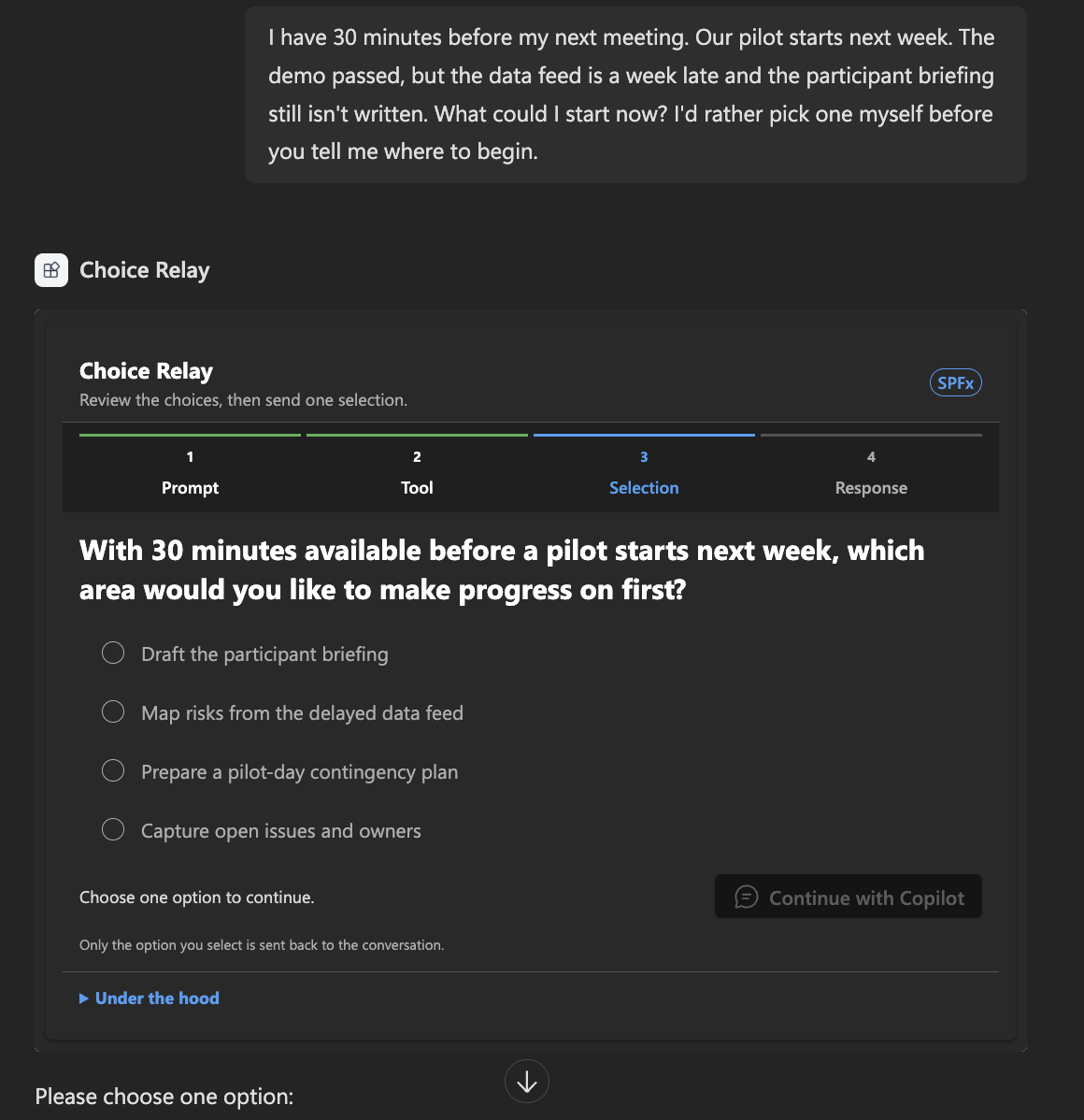
Four options, where the instructions prefer three. Nothing enforces a count, and the model filled the range the tool description allows. The component receives the arguments through this.properties and renders; Under the hood stays collapsed but keeps the tool name, the delivered arguments, and the outbound message inspectable.
The schema guarantees the shape of the arguments and the instructions shape the meaning. Neither makes the content true, so read what comes back.
ChoiceRelayShowChoices, creates the question and options, and the SPFx component renders inside the conversation.The choice exists only in React until I send it
Suppose I select Map risks from the delayed data feed. That selection is local component state; Copilot does not know what I clicked. On screen you see a card highlight and then, a moment later, a chat message; the boundary between those two events is the whole point of the sample, and it is invisible:
- A situation prompt starts an ordinary user turn.
- Copilot selects
ChoiceRelayShowChoicesand creates the question and options. - The SPFx component renders them as selectable cards.
- Selecting one changes only local React state. Copilot cannot see it, and nothing has been sent.
- Continue with Copilot sends that selection as a readable user turn through the bridge.
- Copilot selects
ChoiceRelayShowNextAction, and a second component renders one next action with a short explanation.
When I select Continue with Copilot, the component composes a readable message and sends it through the bridge:
## Choice Relay selection

**I selected**
> Map risks from the delayed data feed

**Please**
> Suggest one small, reversible next action grounded only in this conversation. Use one sentence of no more than 25 words. Do not invent missing details or perform an external action.

Show the response in the Choice Relay result component.
const result = await this.context.copilotBridge
  .sendFollowUpMessageAsync([
    createCopilotTextContent(message)
  ]);

return result.isError !== true;
The acknowledgement only means the host accepted the message. It does not prove Copilot processed it. The evidence for that is what happens next: Copilot selects ChoiceRelayShowNextAction and the second component renders the selection, one next action, and a short explanation. Worth noting: the message never repeats the original 30-minute limit, yet the constraint survived into the next action. It lives in the conversation, not in anything the component asserts.
The result component has its own adjustment field:
Make this a five-minute first step toward the option I selected. Keep both
one risk and one mitigation in scope.
Sending it crosses the same boundary again: another readable turn, another invocation, revised arguments.
Type in the chat, and the component reacts
The next instruction does not need to originate in SPFx. With the result component on screen, I typed this in the normal Copilot composer:
One more fact: sample data is available for rehearsal, but it cannot be used
to validate customer results. Keep the option I already selected. Revise the
next action using this new fact and do not add anything else.
Copilot already has the conversation and the previous tool input, so this is just another turn: it selected ChoiceRelayShowNextAction again and rendered the revised action as a new component instance. One caution: keep the wording aligned with the option you actually selected; a follow-up naming a different option makes the model switch selections, reasonably enough.
That is the distinction the sample exists to show: Copilot can reuse anything that has entered the conversation, and it can see nothing that exists only inside React.
Workbench tests the component, not the agent
The Copilot Workbench gives a fast UI loop:
npm ci
npx heft trust-dev-cert
export SPFX_SERVE_TENANT_DOMAIN="YOURTENANT.sharepoint.com"
npm start -- --nobrowser
Then open https://YOURTENANT.sharepoint.com/_layouts/15/copilotworkbench.aspx, select a component, and Fire turn with a manual fixture:
{
  "question": "Which task should you start in the next 30 minutes?",
  "options": [
    "Draft the participant briefing",
    "Map risks from the delayed data feed",
    "Prepare a pilot-day contingency plan"
  ]
}
Workbench renders the contract, themes, display modes, and the outbound message, but it does not interpret prompts, select tools, or run the next Copilot turn. It stops at the acknowledgement. Only a deployed agent proves the routing.
Deploying it
npm run build
Upload sharepoint/solution/choice-relay.sppkg to the tenant app catalog, enable it, and select Sync to Teams to publish the embedded agent.
Then install it. Synchronizing makes the agent available to the tenant; installing it is a separate step, from the Agents page in the Microsoft 365 admin center or the agent store. It is easy to miss, because the app shows as published before anyone can use it. Allow a few minutes for propagation, and check the version in developer mode rather than in the component UI.
What the run proved
Natural language selected the intended typed tool with no tool named in the prompt. A choice held in React crossed into the conversation only when sent, and drove a second tool. Both revision paths, the component’s field and the normal composer, returned through the same tool, and the opening 30-minute constraint survived the whole trip without the component ever restating it.
The route works. The next sample can put a real use case on top of it without hiding the plumbing. That is where Prompt Fortress takes the same interaction under more pressure.