


Using an LLM backend from an SPFx web part is becoming routine. Wiring it up securely is still where most projects bleed time. The function key ends up in config/serve.json. From there it ends up in the bundle. From there it ends up on every reader’s machine. The samples that ship with this pattern are explicit about being samples — and most production code ends up looking exactly the same.
spfx-foundry-deploy
is a small Node script framework I built to stop doing that. It provisions a Microsoft Foundry resource and a Function App proxy in front of it, hardens the auth chain (Easy Auth + a Backend API Entra app + system-assigned managed identity), and writes the configuration the calling SPFx web part needs into its serve.json. One config file, one command, one resource group.
A working example lives in mcp365-foundry-chat
— a deliberately minimal SPFx web part that uses the deployer end-to-end. It’s the smallest thing I could ship that proves the auth chain works: send a message, get a Foundry response. No MCP yet, no tool-calling, just the wire from browser to model with no shared secret in between.
The MCP365 Explorer series so far has been one capability per post — SharePoint, Calendar, Mail, Teams, OneDrive, Word. This post is the sidebar that goes underneath all of them: the auth path to Microsoft Foundry that has to be solid before the LLM-wired posts coming next can stand on it.
Microsoft Foundry is the rebranded name for what was Azure AI Foundry; the rename took effect at Ignite 2025 and was formalized in the January 2026 product terms. Code paths and SDKs are unchanged — only the brand.
How it works
AadTokenProvider"] -- "AAD bearer
(audience-pinned)" --> B["Easy Auth
Entra-required, 401"] B -- "validated principal" --> C["Function App
app-role check
(returns 403 if missing)"] C -- "system-assigned
managed identity" --> D["Microsoft Foundry
gpt-5-mini deployment"]
No shared secret on the client. No API key on the server. Easy Auth pins the audience to the Backend API; the proxy enforces an app role per deployment so authenticated-but-unauthorized callers get a 403, not a free pass. Managed identity carries the call from the Function App to Foundry — the only “key” anywhere is a role assignment in Azure RBAC, and it lives next to the resources, not in your code.
Running it
In your SPFx web part folder:
npx -y github:ferrarirosso/spfx-foundry-deploy deploy
That’s the whole quick start. There’s no config to write — when the deployer doesn’t find a deploy.config.json, it auto-generates one. slug comes from your package.json name field (with any @scope/ prefix stripped), profile defaults to chat-completions, everything else gets asked for in the form. The deployer tells you what it picked up front:
No deploy.config.json found — using slug="my-webpart" (from package.json 'name'), profile="chat-completions" (default).
Most folks wire this as an npm script and use npm run deploy from then on. Add to your package.json:
{
  "scripts": {
    "deploy": "npx -y github:ferrarirosso/spfx-foundry-deploy deploy",
    "deploy:dry-run": "npx -y github:ferrarirosso/spfx-foundry-deploy deploy --dry-run",
    "teardown": "npx -y github:ferrarirosso/spfx-foundry-deploy teardown"
  }
}
That’s how the example web part further down is wired.
If you want to commit specific values — a prefix you’ve chosen, a region, a serveProperties.environmentId that should be prompted on every deploy — drop a deploy.config.json next to your package.json. The schema
lists the fields.
The first thing you see is a single review screen. Multi-step wizards train you to hit Next without reading; one screen with arrow-key navigation gets read every time.
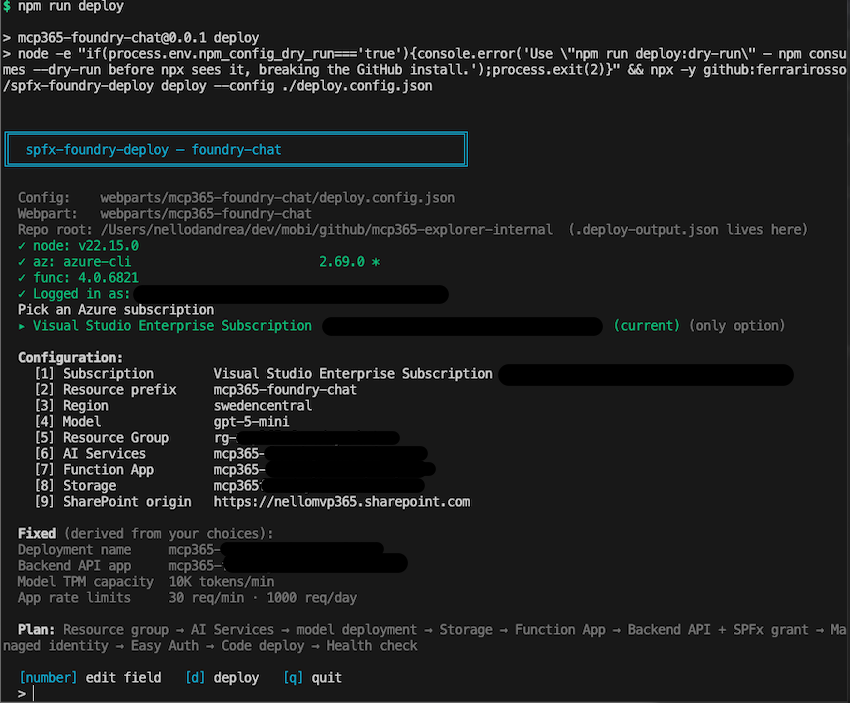
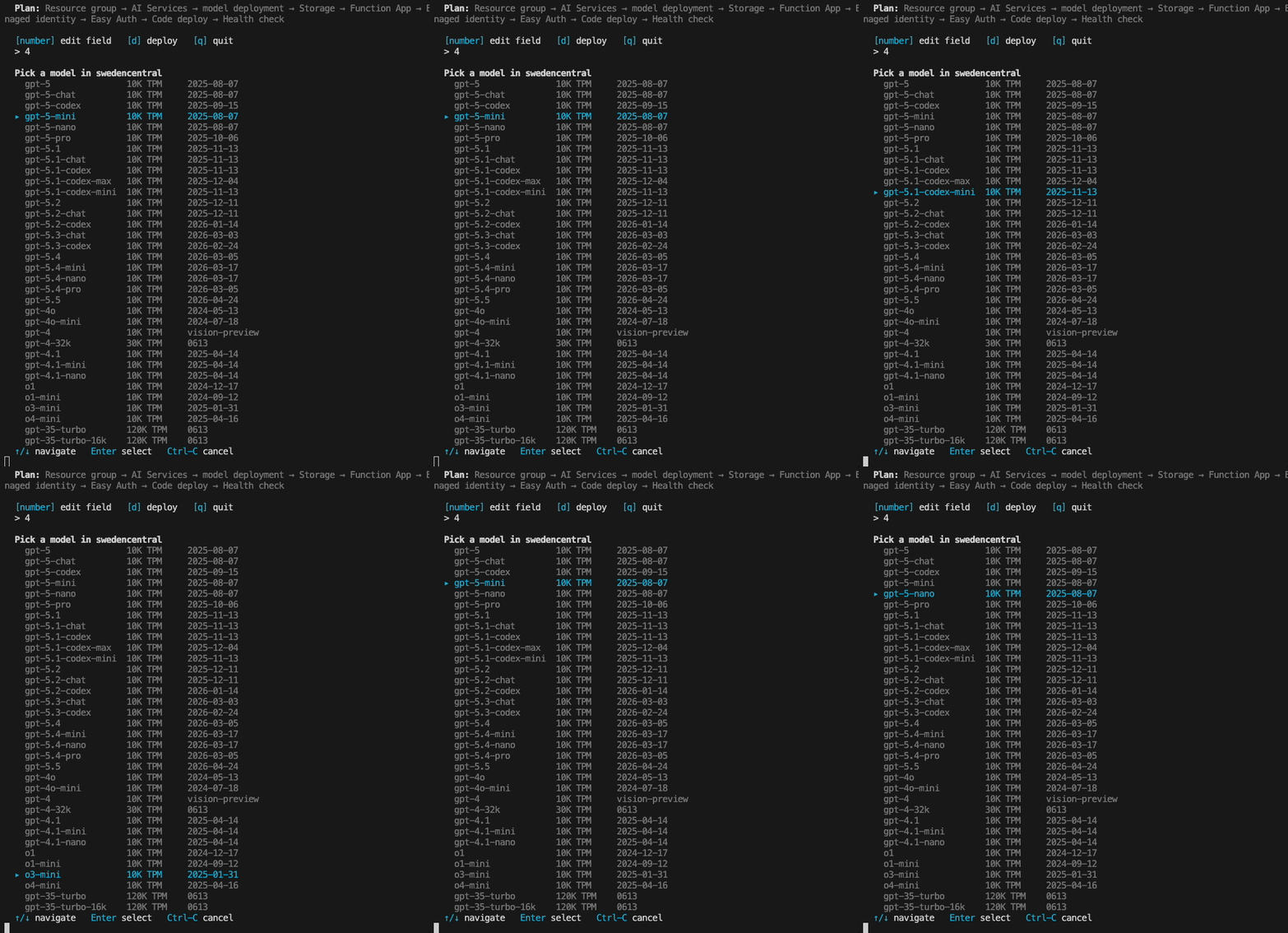
Pick a prefix (or generate one), pick a region. The model picker re-validates against the chosen region — switch from Sweden Central to West US 3 and the available models update on the spot. No multi-page wizard state to keep in sync.
Confirm and the deployer walks through the steps — resource group, Foundry resource, model deployment, storage, function app, Entra app + scope, managed identity + role, code deploy, app settings, Easy Auth, platform hardening, Application Insights, health check.
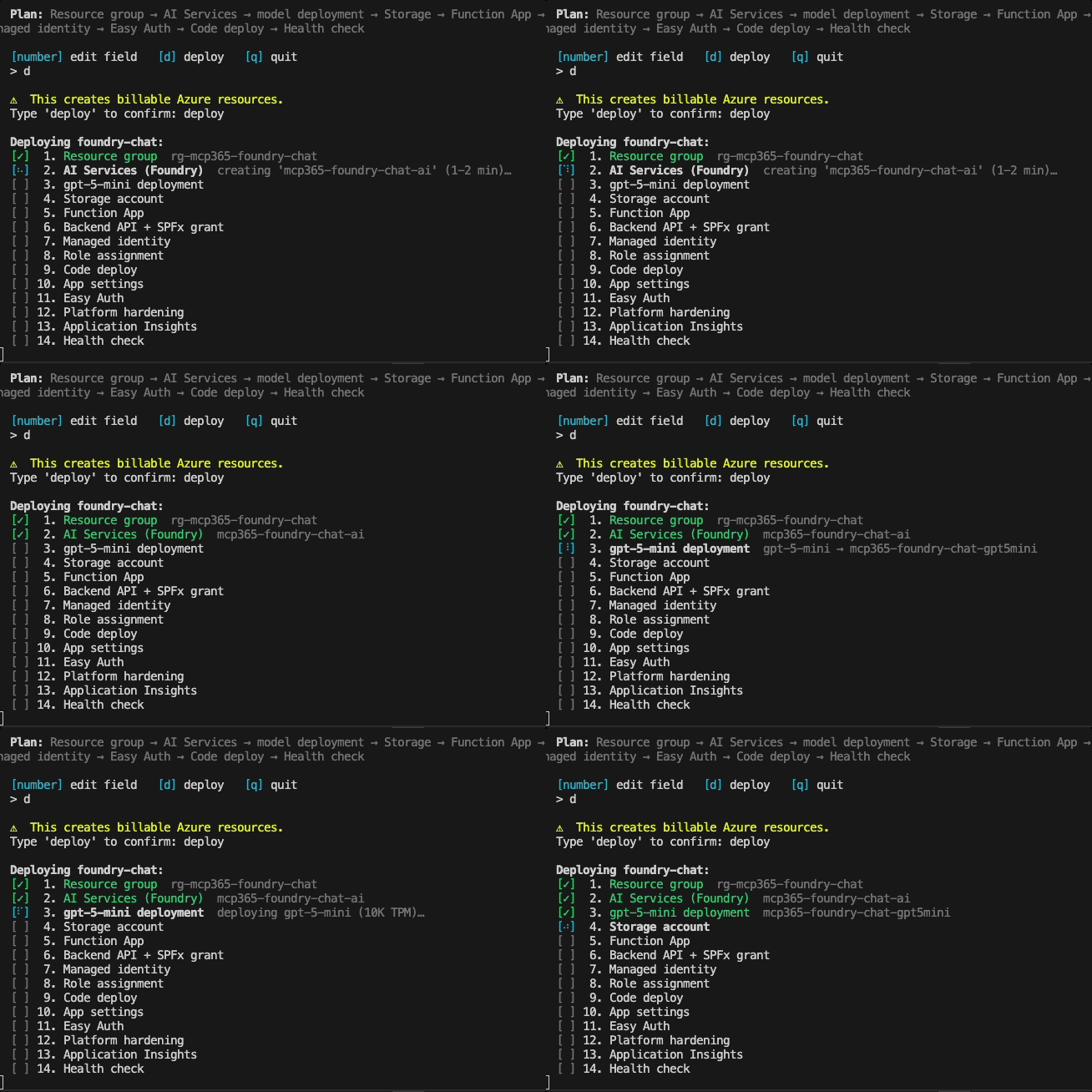
A few minutes later it prints the resource names and the endpoint URL. The web part’s serve.json already has the backendUrl and backendApiResource filled in. npm start opens the workbench ready to chat.
--dry-run walks the form and prints the plan without touching Azure. Useful for seeing what’s about to happen before it does.
There’s also one step the script can’t do for you — an admin needs to approve the webApiPermissionRequests declared in the .sppkg from the SharePoint Admin Center, on the API access blade. The deployer auto-grants the SPFx → Backend API consent via Microsoft Graph when it can; if the running account doesn’t have the rights, it prints a fallback URL.
A few notes
Three things this took building to know.
The first is the obvious one once you see it — the browser doesn’t need the function key, and never did. The reason it kept showing up in samples is that wiring the alternative (Easy Auth + managed identity + Backend API Entra app + SPFx grant) by hand is a half-dozen pieces that have to align exactly. Once they’re aligned, the function key isn’t part of the auth path at all — Easy Auth runs at the App Service tier in front of the function code, so the function never even checks for x-functions-key.
The second is soft-delete, and it bites. Delete the resource group and try to redeploy with the same prefix in the next 48 hours, and you’ll hit a quota wall that doesn’t appear anywhere in the Azure portal. Azure AI Services keeps a soft-deleted record that reserves the name and the model deployment’s TPM quota tenant-wide. The deployer detects these records and auto-purges before recreating; the teardown subcommand offers an interactive purge at delete-time so you don’t pay the 48-hour tax on accident.
The third is small, but I keep coming back to it. The cross-validation between the region picker and the model picker is hard to get right across multiple wizard pages, and easy on a single review screen — it’s just rendering instead of state synchronization. The single screen also gets read; multi-step wizards train you not to.
Tearing it down
When you’re done, npm run teardown shows the same single-screen treatment in reverse — a plan view of what’s about to be deleted, with the option to interactively purge the soft-deleted Foundry record at the same time.
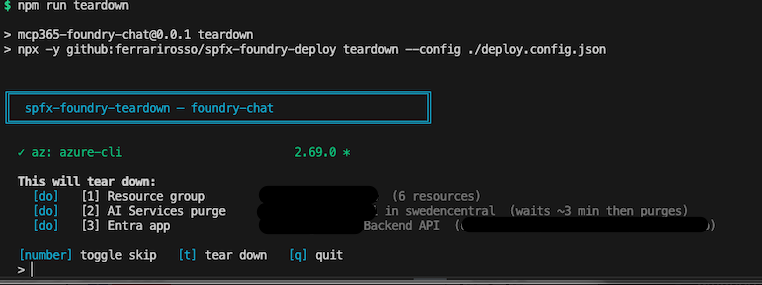
The Backend API Entra app survives the resource group delete by default (it lives in Entra, not in the resource group), so teardown asks separately whether to remove it. Keeping it makes a redeploy faster; deleting it gives you a fully clean slate.
The example web part
mcp365-foundry-chat is the minimum viable consumer — and intentionally ships with zero config of its own. The flow has two halves: the deployer side, and the SharePoint side.
git clone https://github.com/ferrarirosso/mcp365-explorer
cd mcp365-explorer/webparts/mcp365-foundry-chat
npm install

# Backend
npm run deploy            # provision Foundry + Function App + Easy Auth + managed identity

# SPFx package
npm run build             # heft → sharepoint/solution/mcp365-foundry-chat.sppkg
When npm run deploy finishes it prints the two values you’ll need on the SharePoint side — backendUrl (the proxy endpoint) and backendApiResource (the Backend API resource id). Keep them on the clipboard.
Then on SharePoint:
- Upload
sharepoint/solution/mcp365-foundry-chat.sppkgto your tenant App Catalog. - Approve the API permission request from SharePoint Admin Center → Advanced → API access — that’s the step the script can’t do for you.
- Add the app to a SharePoint site, edit a page, and drop the mcp365-foundry-chat web part on it.
- Open the property pane and paste
backendUrlandbackendApiResourcefrom the deploy output. - Save the page and send a test message.
If a Foundry response comes back, the whole auth chain works end-to-end. AAD bearer → Easy Auth → Function App → managed identity → Foundry. The LLM scenarios in upcoming posts stack on top of this.
Resources
spfx-foundry-deployrepo — the script framework, the JSON config schema, and the four subcommandsmcp365-foundry-chatweb part — the working example- MCP365 Explorer series — introduction
- Microsoft Foundry product page