


Microsoft 365 Copilot has started a rush to make organizational knowledge easier to share, find, and use with AI. Most projects begin with the same ambition: connect more content and make it discoverable. But not every SharePoint site should participate in broad Copilot discovery in the same way. There are also scenarios where we deliberately need to restrict what Copilot can surface from SharePoint.
This is often described as restricting Copilot access. The wording matters because the available controls do different things. Restricted Content Discovery, or RCD, restricts discovery. It does not change SharePoint permissions. That distinction became central during my tests.
In this article, I share my experience enabling RCD on a site containing a SharePoint list and the unexpected impact it had on our PnP Modern Search solutions. Those solutions used SharePoint Search with a saved SharePoint result source to scope the results. After RCD was enabled, the standard list search continued to work, but the saved result source wired into the PnP Search Results web part no longer returned the expected items.
Getting the solution working again required two changes. First, I replaced the Path: restriction with NormSiteID and NormListID. Second, I stopped selecting the saved result source in the PnP web part, returned to the default/local SharePoint result source, and copied the identity-based scope directly into the web part’s Query template.
This was a plain SharePoint list / Microsoft List, not a document library full of sensitivity-labeled Office files. Everything below is from one tenant and one investigation. The behavior is an observation, not a product contract, but it shows why the exact configuration of a search web part matters when RCD is introduced.
Five actions, five different effects
It is tempting to translate the requirement into one SharePoint setting. In reality, it crosses several layers that are easy to mix together:
| When you… | You are controlling… |
|---|---|
| Hide a list from navigation or remove fields from forms and views | Presentation: what people see in the SharePoint interface |
| Turn off search visibility for a site or list | Search discovery: whether the content appears in search-driven experiences, including human search |
| Enable Restricted Content Discovery | Broad discovery: whether the site appears in organization-wide search and Microsoft 365 Copilot responses |
| Configure DLP for Microsoft 365 Copilot | Copilot processing: another control to evaluate, but not part of this investigation |
| Change SharePoint permissions | Access: which users can open the content and what Copilot can access in their security context |
That is the distinction I needed. Hiding changes the interface. Search visibility changes search. RCD changes broad discovery. DLP changes how Copilot handles supported content. Permissions decide access.
A hidden list can still be opened by a user who has permission and knows its URL. A field removed from a view can still be available through another view or API. These are useful experience choices, but they do not revoke access.
Disabling search visibility was also the wrong layer for this requirement. It removes the normal index-driven route that the human search experience needs. I wanted to reduce broad Copilot discovery without dismantling the curated SharePoint search experience I still needed.
The PowerShell name tells the RCD story
In the SharePoint admin center, the switch is presented as Restrict content from Microsoft 365 Copilot. The underlying site property gives me a better mental model:
Set-SPOSite -Identity "https://contoso.sharepoint.com/sites/demo" `
  -RestrictContentOrgWideSearch $true
RestrictContentOrgWideSearch is the important name. RCD is not a Copilot-only off switch. Microsoft documents it as a temporary governance control that restricts content from organization-wide search and Copilot discovery while access and permissions are reviewed.
The current RCD documentation is explicit about several boundaries:
- it does not change SharePoint permissions;
- it does not remove content from the Microsoft 365 search index;
- users can continue to access content for which they already have permission;
- recently interacted files are included in the restriction; and
- searches originating from site context, and experiences operating on content already in use, are treated differently from organization-wide discovery.
Those last two points matter when testing. RCD now explicitly includes recently interacted files, but it does not promise that every trace of an accessible item disappears from every site-context or already-in-use experience.
The restricted badge appeared quickly in my test site, but the downstream result set did not settle immediately. Microsoft warns that propagation depends on site size and concurrent updates. An unsettled result set during that window is a reason to keep testing, not proof of a stable rule.
Then one search kept working
After RCD was enabled, the modern search box inside the list still returned items. That made sense: it was a search performed in the context of the list, by a user who already had access.
My PnP Modern Search page told a different story.
The existing web part used the SharePoint Search data source and selected a saved custom result source. The list’s Path: restriction lived inside that saved result source, not in the Search Results web part’s Query template:
Data source: SharePoint Search
Result source: <saved-custom-result-source>
Query template in the web part: {searchTerms}
List scope: Path restriction inside the saved result source
Once RCD was active, that experience first returned fewer results and then became unstable or empty. The human-facing list search survived, but the search-driven rollup I wanted to preserve did not.
My first mental model was too broad: RCD breaks the result source, and no query-side construction will bring the content back.
That conclusion did not survive the next round of tests.
The community clue was NormSiteID
In PnP Modern Search discussion #4647
, Mikael Svenson suggested adding a NormSiteID filter to the query template for an RCD scenario. That gave me a better diagnostic direction.
I inspected a known list item in SharePoint Search and retrieved its NormSiteID and NormListID. The first identifies the site collection in the search index; the second identifies the list.
In this tenant, the normalized site and list values happened to match SiteID and ListID. I would not rely on that match. Retrieve the values from actual results and use what the index returns.
Replacing the URL-shaped Path: restriction with the two index identity properties was the first change. Moving that scope out of the saved result source and into the PnP Query template was the second.
Two changes made the difference
It is important not to collapse the result into one workaround:
- The list scope changed. I replaced the URL-based
Path:restriction with the search-index identity propertiesNormSiteIDandNormListID. - The saved result source stopped working through PnP. When I selected the saved SharePoint result source in the PnP Search Results web part, it did not return the expected items under RCD. I had to stop using that result source in the web part, switch back to the default/local SharePoint result source, and copy the scoping query directly into the web part’s Query template using
NormSiteIDandNormListID.
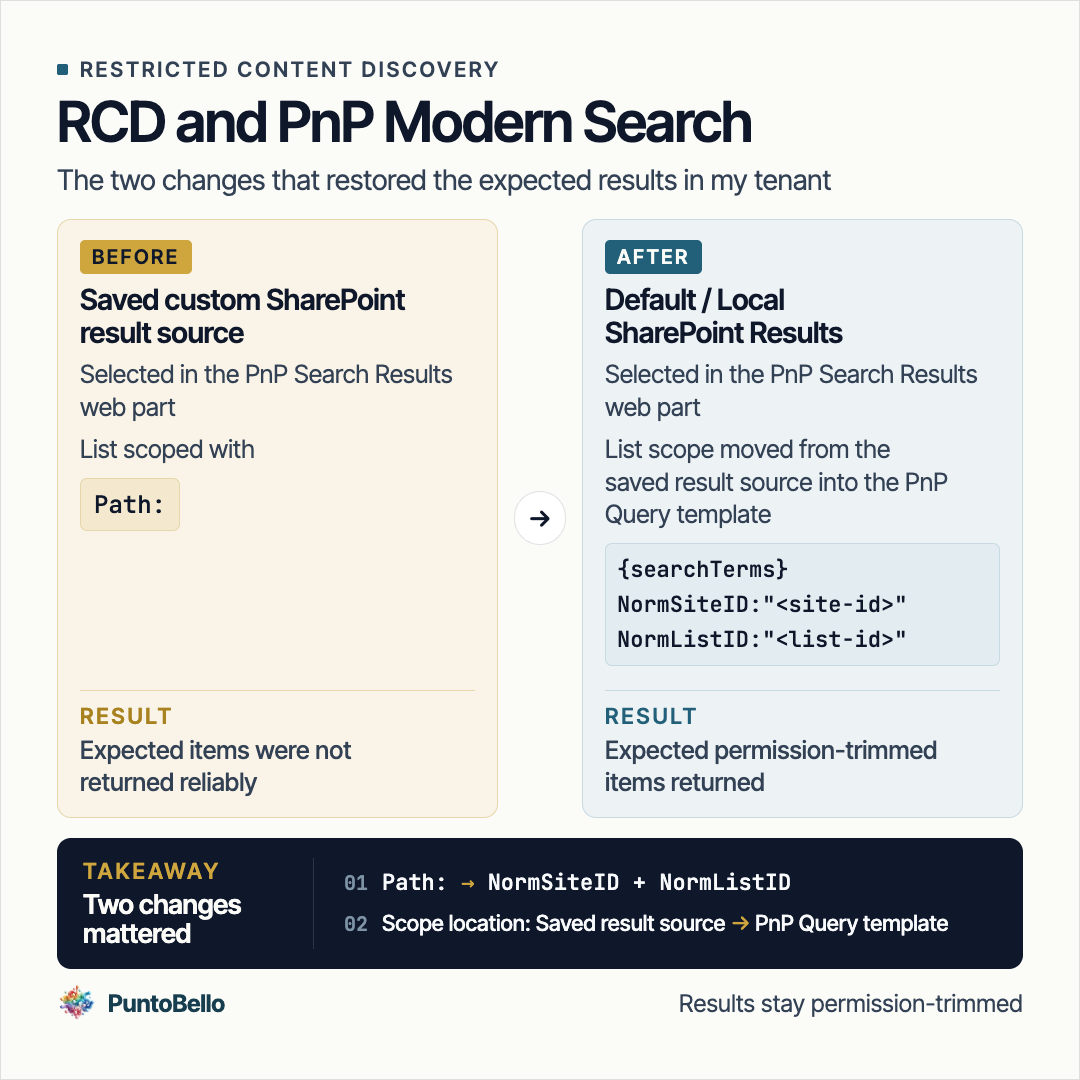
The working result required both a different list scope and a different place to execute that scope.
This is a field observation, not a claim that every saved result source fails under RCD. I changed both the scoping expression and the execution path, so I treat the final combination as the configuration that worked. It does not prove that NormSiteID alone caused the difference.
I used Search REST during troubleshooting to prove that the identity-based KQL itself worked. That was useful evidence for me, but it is not the part every reader needs to reproduce. The transferable finding is simpler: the saved result source and the direct PnP Query template did not behave the same way in this RCD scenario.
I cannot claim the undocumented internal reason for that difference from this test. I can claim the practical lesson: test the configuration your web part actually uses.
The PnP configuration that worked
The reliable configuration in my test reflects both changes: the custom result source was no longer selected, and the identity-based list scope was written inline in the PnP Query template.
Data source: SharePoint Search
Result source: default / empty / Local SharePoint Results
Query template:
{searchTerms} NormSiteID:"<site-id>" NormListID:"<list-id>"
This is the minimal scoping pattern, not my complete production query. The actual comparison retained the same list-page, publication-state, and date filters on both paths; I have omitted those business-specific clauses here for clarity. The query remains permission-trimmed and grants no access by itself.
PnP documents both the query-template and result-source settings on the SharePoint Search data source.
This did not bypass RCD
The query did not make the site broadly discoverable again. It targeted a known site and list by their exact index identities inside a deliberately configured web part. SharePoint Search still permission-trimmed the results. A user without access did not gain access because the KQL named the list.
The distinction is the same one that shaped the original requirement:
RCD restricts discovery. Permissions restrict access.
The identity filters restored one controlled search experience for people who already had permission. They did not turn a discovery control into a security boundary, and they did not remove the need to review who can read the list.
The explicit URL was not consistent
One more test made the boundary less predictable. With RCD active, the explicit-list-URL test did not produce one stable rule across users. In one user context Copilot could work with the list; in another it did not.
Permissions are the first thing to validate, but I do not have enough evidence to attribute the remaining difference to RCD, user history, propagation, or another service-side factor. Microsoft documents that RCD leaves direct SharePoint access unchanged, but that does not guarantee consistent Copilot behavior when an explicit list URL is provided. Test the actual users and experience, and do not treat either outcome as proof of an access boundary.
If the requirement is that Copilot must never process the content, inconsistent URL behavior is not evidence of enforcement. RCD alone is not that control.
Microsoft Purview also provides DLP controls for Microsoft 365 Copilot and Copilot Chat , but I did not evaluate them as part of this investigation.
A shorter playbook
The next time I face this requirement, I would keep the investigation shorter:
- Name the layer first: presentation, search discovery, Copilot processing, or access.
- Test the human list and PnP experiences before enabling RCD, then repeat after propagation.
- Use the same representative users for every test; the explicit-URL behavior was not consistent across users in my investigation.
- If the saved result source becomes incomplete, try the default/local SharePoint Search source with
NormSiteIDandNormListIDin the PnP Query template.
Search REST can remain the deeper troubleshooting tool when the two PnP configurations still do not explain the difference.
The developer documentation still has a gap
Microsoft’s RCD documentation explains the user-facing boundary well. What is still difficult to predict is how custom result sources and search web parts such as PnP Modern Search will behave.
I do not want to turn one tenant’s behavior into a general rule. But these paths should be documented well enough that developers can tell intended behavior from an implementation detail, and know which combinations are supported.
Until then, my final takeaway is deliberately narrow:
RCD does not simply break “SharePoint search.” In this investigation, the working configuration required two changes: replacing
Path:withNormSiteIDplusNormListID, and moving that scope from the saved result source into the PnP Query template.
For this list, the pattern that worked was SharePoint Search, the default/local result source, and NormSiteID plus NormListID in the Query template. For governance, the pattern remains even simpler: use RCD to reduce broad discovery, and use permissions when access itself must change.