


This post connects two things. The first is the Work IQ SharePoint Lists MCP server, called directly from a SharePoint webpart — the pattern of the previous seven posts in this series, no backend, just fetch + AadTokenProvider + JSON-RPC. The second is Microsoft Foundry sitting behind a protected Function App, deployed with spfx-foundry-deploy
— keyless to Foundry, Easy Auth on the way in. The connection itself is a small agent loop in the browser that lets the LLM call Work IQ tools by name.
As with the other servers in this series, the Work IQ MCP servers are in preview and may change.
Microsoft Foundry is the rebranded name for what was Azure AI Foundry; the rename took effect at Ignite 2025 and was formalized in the January 2026 product terms. Code paths and SDKs are unchanged — only the brand.
How it works
Two paths, one webpart. MCP stays browser-side: the user’s AAD token reaches the Work IQ gateway in a delegated context, no extra hop, no server-side OBO to manage. The LLM stays behind a proxy: no API key in the bundle, Easy Auth on the way in, managed identity to Azure OpenAI on the way out.
SPFx webpart"] B -- "user AAD token
(JSON-RPC)" --> M["Work IQ MCP
SharePoint Lists server"] B -- "Entra bearer
(chat completions)" --> P["Function App
Easy Auth"] P -- "managed identity" --> O["Azure OpenAI
gpt-5-mini"]
The split is deliberate. Browser-side MCP keeps the user’s identity intact all the way to the gateway — list-level permissions, sharing scopes, sensitivity labels are evaluated against the actual signed-in user, not against an app-only token. The proxy isolates the part of the system that needs a real API credential (Azure OpenAI) so that credential never has to be near a browser bundle. The proxy enforces an app role per deployment so authenticated-but-unauthorised callers get a 403, not a free pass. Easy Auth is the moat; without it, the proxy would be a public LLM endpoint anyone with the URL could hit.
The agent loop, in thirty lines
The loop is the Tiny Agents pattern. The body fits on one screen:
async function runAgent(userMessage, history, ctx, onTrace) {
  const messages = [...history, { role: 'user', content: userMessage }];
  for (let turn = 0; turn < MAX_TURNS; turn++) {
    const token = await ctx.getUserToken();
    const res = await fetch(`${ctx.proxyUrl}/api/chat/completions`, {
      method: 'POST',
      headers: { 'Authorization': `Bearer ${token}`, 'Content-Type': 'application/json' },
      body: JSON.stringify({ messages, tools: mcpToolsToOpenAI(ctx.tools) })
    });
    const choice = (await res.json()).choices[0];
    onTrace({ kind: 'llm_call', /* ... */ });
    messages.push(choice.message);
    if (!choice.message.tool_calls) return messages;       // done
    for (const tc of choice.message.tool_calls) {
      const args = JSON.parse(tc.function.arguments);
      const result = await ctx.client.callTool(tc.function.name, args);
      onTrace({ kind: 'tool_call', name: tc.function.name, args, result });
      messages.push({
        role: 'tool', tool_call_id: tc.id,
        name: tc.function.name,
        content: mcpResultToToolContent(result)
      });
    }
  }
}
Thirty lines is the design, not an accident. Three real alternatives were on the table and got rejected:
- LangChain / LangGraph. Battle-tested, helpers for everything, MCP adapters available. Heavyweight bundle for the browser, opinionated abstractions that obscure exactly what a C-track post is trying to teach (the loop itself), and an MCP adapter to learn on top.
- Vercel AI SDK. Modern, React-idiomatic, the
toolprimitive is clean. Tight coupling to Next.js / edge runtimes, hooks designed around streaming-first UIs this post isn’t using, and SPFx 1.22’s React 17 + Heft toolchain doesn’t compose smoothly with the SDK’s ESM packaging. - MCP-specific orchestrators. A few are emerging; most are server-side, none have a strong SPFx story.
What’s left is hand-rolling four primitives — schema translation, 429 retry, a turn cap, trace events — and those primitives are the educational core, the part worth showing inline rather than abstracting away behind a framework. Two of them are small enough to mention in passing: a pair of helpers in agent/toolTranslation.ts translate between MCP’s tool schema and OpenAI’s tool-call format, defensively enough that a hallucinated description or a bad shape from the LLM can’t stall the chain.
The 429 handler is the one I’d point at if asked which primitive matters most. Two services in this chain can rate-limit — the Function App proxy (per-caller quota, to keep one user from torching the deployment’s spend) and Azure OpenAI itself (TPM / RPM saturation on the model deployment). The proxy forwards rate-limit headers so the browser can tell “my quota is the bottleneck” apart from “upstream model is the bottleneck”; the trace pane shows the difference (“throttled by Azure OpenAI · retrying in 8s” instead of a spinner that looks broken).
“This site” — context, not retraining
The first time I typed “What lists are on this site?” into the workbench, the model called listLists({ siteId: "root" }) and returned tenant-root system lists — SharePointHomeOrgLinks, CSPViolationReportList, that kind of thing. Wrong site. The model has no way to know what “this site” means; the webpart was sending a generic system prompt with no site context.
The fix is small and tells the whole story of how this pattern actually works:
const pc = this.context.pageContext;
const hostname = new URL(pc.web.absoluteUrl).hostname;
const currentSiteId = `${hostname},${pc.site.id.toString()},${pc.web.id.toString()}`;
const currentSiteUrl = pc.web.absoluteUrl;
BaseClientSideWebPart.context.pageContext already knows the answer — every SPFx webpart does, by virtue of where it’s rendered. The fix was to compose the canonical Work IQ siteId (the host,siteGuid,webGuid tuple) and inject it into the system prompt with explicit instructions:
Current SharePoint context (use this when the user refers to "this site"...):
- Site URL: <currentSiteUrl>
- siteId:   <currentSiteId>

When a tool needs a siteId argument and the user has not named a different site,
use the siteId above.
After: the same model calls listLists({ siteId: "tenant.sharepoint.com,<siteGuid>,<webGuid>" }) and returns the actual lists on the actual site. No retraining, no fine-tuning, no model upgrade — just the engineering choice to put the relevant context where the model can see it. Models behave correctly in a new domain through context, not retraining. That’s the design win, and it’s the whole reason the rest of this loop is small.
What it looks like
Setup: a pre-seeded Project Backlog list with three rows. The webpart connects to mcp_SharePointRemoteServer, calls tools/list, and feeds the 35 tools it gets back into the LLM’s tool array. Then I type.
Turn 1 — Two tool calls from one sentence
Add an item to the Project Backlog list: title ‘Record C1 demo GIF’, priority High, status In Progress

Two tool calls from one sentence: listLists to resolve the name to an ID, then createListItem with the resolved ID and the requested fields. I didn’t write the workflow; the model produced it from the schemas alone.
Turn 2 — One tool call, history carries the rest
Show me the items in the list
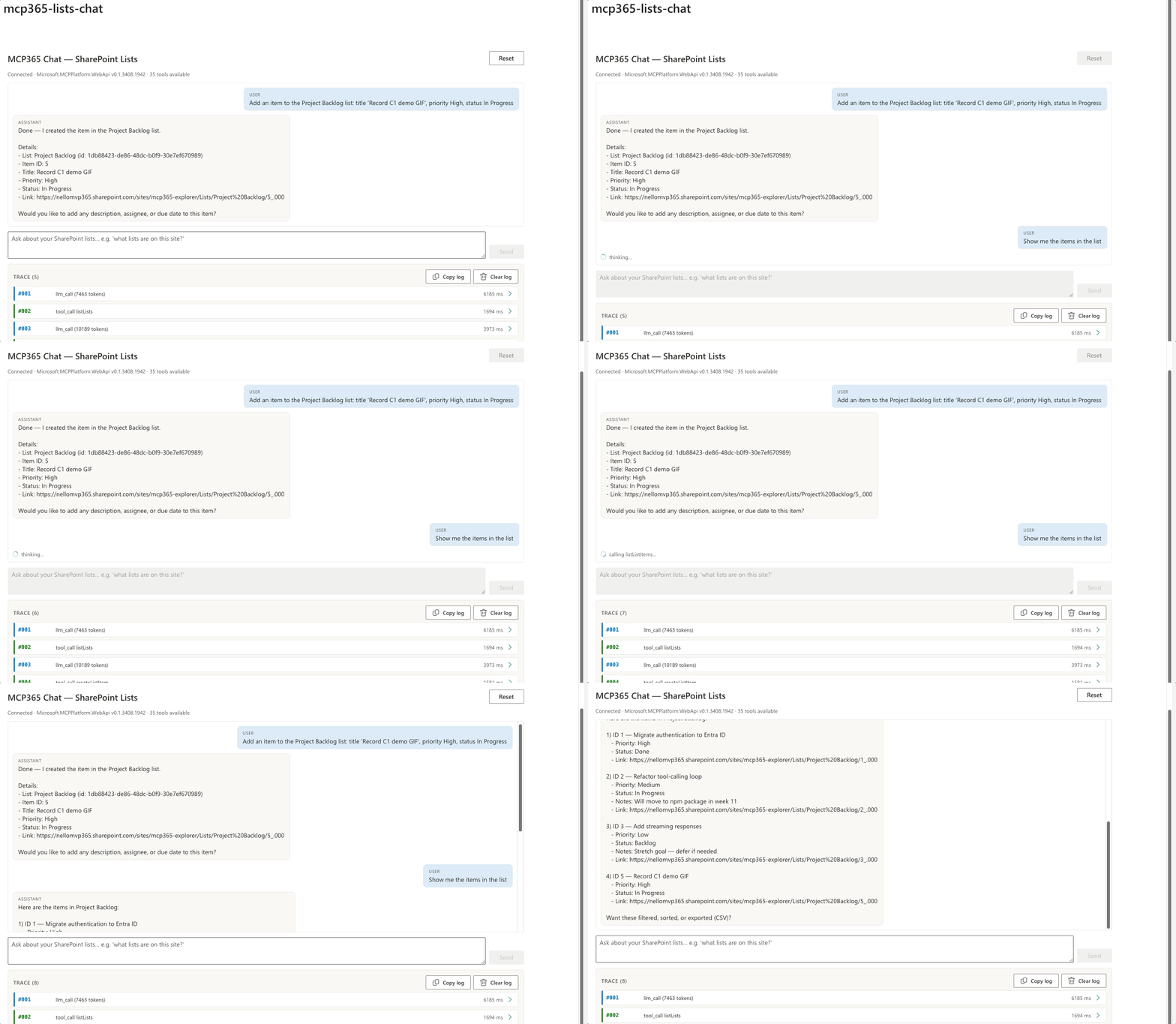
No second listLists. The list ID from turn 1 is still in conversation history, so the model goes straight to listListItems. “the items” resolves itself — the model carries the reference from the previous tool result.
Turn 3 — Zero tool calls, in-memory reasoning
What was the last one?
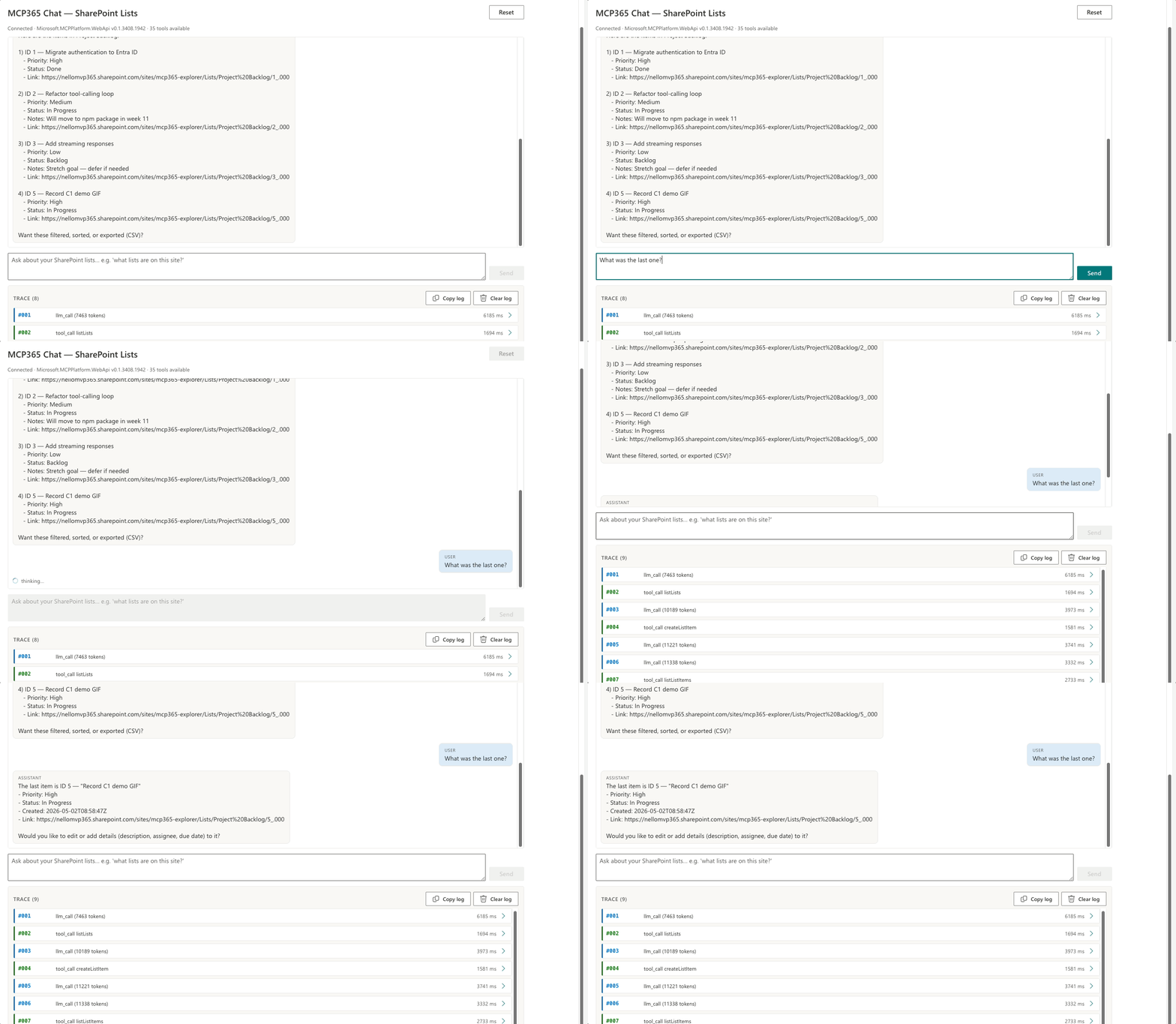
Zero tool calls. The trace shows one llm_call and stops. The data is already in the conversation; the model sorts it by createdDateTime in memory and answers “Record C1 demo GIF, ID 5, created today.” The agent loop does more than route tool calls — it also reasons over what the tools returned.
What I Learned
Dynamic doesn’t mean no wiring. tools/list advertises shapes, not behaviour. A wrong-shaped argument still 400s, and the LLM picks tools well long before it picks fields well. The trace pane earns its keep here — every call, every payload, every result, auditable in real time. You learn the server by watching the model use it.
A language interface is a free multilingual UI. The same SharePoint webpart speaks German, Italian, French, Japanese without a single i18n string. The LLM handles natural language → tool args; the tools work on canonical English field names. “Welche Listen gibt es auf dieser Site?” gets the same listLists call as “What lists are on this site?”. A multilingual front door for the price of one English webpart — the most under-sold benefit of the whole pattern.
The webpart never hardcodes a SharePoint tool. New tool tomorrow on the server, no code change here. That’s auto-discovery at the per-server level — the seven explorer webparts in this series have been calling tools/list all along to populate UI buttons; now the same call feeds the model’s tool array. The mcp365 webparts in this series are the same primitive at two levels of abstraction.
Known gaps
Two things don’t work for me today. Neither is fatal. I’ve reported both — if you’ve got either working, I’d like to hear about it.
createList and deleteList return 403. Even when I’m signed in as a tenant Global Administrator and McpServers.SharePoint.All is granted explicitly. Item-level operations on the same gateway and the same token (createListItem, createFolder, uploadFileFromUrl, listLists, listListItems) work cleanly, so the credentials look fine. The demos in this post stick to item-level operations only.
Person fields take integer user IDs, not emails. When the LLM sends a fields map for createListItem and one of the fields is a Person/User type, it puts the user’s email there — the natural string representation. SharePoint requires the integer SharePoint user ID — a number like 47, not someone@contoso.com — and returns 400. For the demo I dropped person fields from Project Backlog entirely.
Server Details
| Property | Value |
|---|---|
| Server ID | mcp_SharePointRemoteServer |
| Display name | Work IQ SharePoint |
| Permission scope | McpServers.SharePoint.All |
| Tools | 35 |
| Used in this post | listLists, listListItems, createListItem |
Deploy It Yourself
The webpart needs three values in its property pane: backendUrl, backendApiResource, and environmentId. The first two land in serve.json automatically when you run npm run deploy — the deployer is spfx-foundry-deploy
, which provisions the Function App, the Backend API Entra app, Easy Auth, and the managed identity to Azure OpenAI in one command. The third value is the Power Platform environment GUID (pac admin list). After approving McpServers.SharePoint.All in SharePoint admin centre, you’re done. Full steps in the webpart README
.